1-Visitor
May 24, 2022
Solved

Datum tag in generic part (family table)

  • May 24, 2022
  • 9 replies
  • 2976 views

Hello everyone,

I used family table to create two parts. In the generic part datum A was created on a plane. But this plane (feature) is suppressed in the instance part, so one error occored. But the change and this datum A is needed in the instance part. Could you please tell me how to do it with MBD? Thanks in advance.

Br

Sun
Best answer by pausob

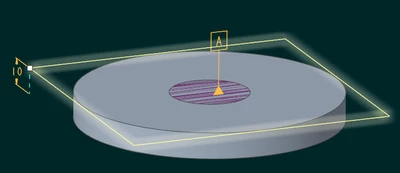
Well, I "faked it" by attaching the datum tag to a surface:

Generic:

pausob_0-1653455822648.png

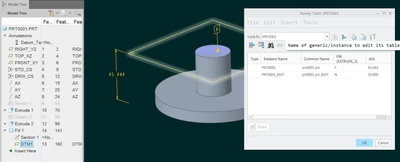
instance:

pausob_1-1653455871174.png

This construction fill surface was then hidden away.  You should also add some relations so it follows the relevant feature sizes.

9 replies

tbraxton
22-Sapphire II
May 24, 2022

The Creo error with the annotation is resolved in this model for the generic and the instance. The annotation plane A is present in the instance without error.I have questions  about documenting a plane on a part that can not be established on the part for inspection but I suppose that is a separate issue.

KenFarley
21-Topaz II
May 24, 2022

You have to redefine the plane you are using for Datum A so it is not suppressed in the instance. This kind of thing happens a lot with section views, etc. You have to be careful when defining features to avoid using references that will be suppressed in instances from a family table. Check your references and replace them.

tbraxton
22-Sapphire II
May 24, 2022

This would be an option to establish a datum reference plane in the context of your family table.


tbraxton_0-1653394037512.png


sundoopi1-VisitorAuthor
1-Visitor
May 25, 2022

Hello  tbraxton,

yes, you are right. But this option is not suitable for our part. 

But thanks too.

Br

Sun

Patriot_1776
22-Sapphire II
May 24, 2022

This is one of the MANY reasons why I do not use MBD at ALL, and put ALL my GD&T info on the dwg.  This way I can easily change anything I want, and not affect anything else.  Also, this eliminates having problems with duplicate datum names at both the part and assembly level (as for a weldment, etc.).

19-Tanzanite
May 25, 2022

@sundoopi , are you trying to accomplish this:

generic:

pausob_0-1653451389240.png

instance:

pausob_1-1653451507197.png


sundoopi1-VisitorAuthor
1-Visitor
May 25, 2022

yes!

pausob19-TanzaniteAnswer
19-Tanzanite
May 25, 2022

Well, I "faked it" by attaching the datum tag to a surface:

Generic:

pausob_0-1653455822648.png

instance:

pausob_1-1653455871174.png

This construction fill surface was then hidden away.  You should also add some relations so it follows the relevant feature sizes.

sundoopi1-VisitorAuthor
1-Visitor
May 26, 2022

Hello all,

thanks for your answers. It looks, that we have to trick the message center with a "faked datum plane".

I found in Creo 6 or higher versions we can have a besser solution: 

(952) Improved Handling Between Parent and Child for Annotations in Model-Based Definition | Creo 6.0 - YouTube


Best regards

Sun