4-Participant
March 3, 2024
Solved

Define complementary angle on flat pattern

  • March 3, 2024
  • 1 reply
  • 1061 views

Hello,

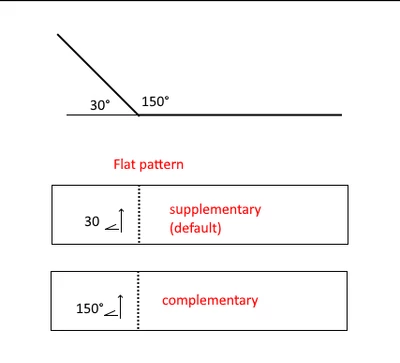
how to set and make default complementary angle when creating flat pattern view?

Software version: Creo Parametric 6.0.5.1
 

GH_9260430_0-1709446435519.png

Thanks in advanced!

Best answer by tbraxton

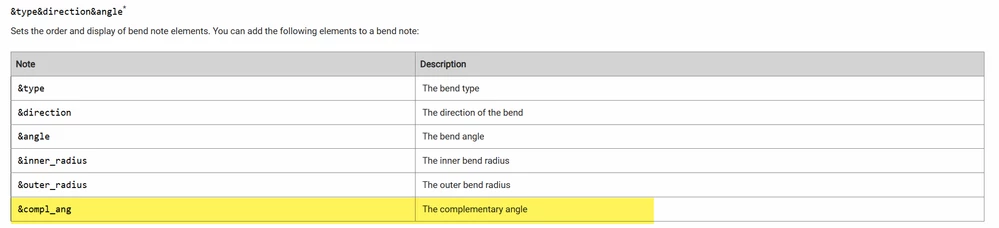
There is a sheet metal config option that can be set such that the complimentary angle is used for bend notes.

tbraxton_1-1709470684688.png


FYI: There is an option to do this when creating a bend with a surface reference. Refer to step 9 in the following link.


To Create a Bend with a Surface Reference (ptc.com)


tbraxton_0-1709470505909.png


1 reply

tbraxton
tbraxton22-Sapphire IIAnswer
22-Sapphire II
March 3, 2024

There is a sheet metal config option that can be set such that the complimentary angle is used for bend notes.

tbraxton_1-1709470684688.png


FYI: There is an option to do this when creating a bend with a surface reference. Refer to step 9 in the following link.


To Create a Bend with a Surface Reference (ptc.com)


tbraxton_0-1709470505909.png


4-Participant
March 4, 2024

Thank you very much! It works!