12-Amethyst
Mar 4, 2024 11:58 AM UTC
Solved

Delete a Value that is driven by a Parameter

Hi,


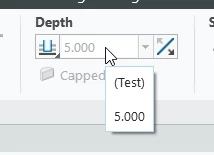
I have an Extrude Feature where the Value "Depth" is driven by a parameter (here: Test). This works, anything ok.

MP_9215870_0-1709553277907.png


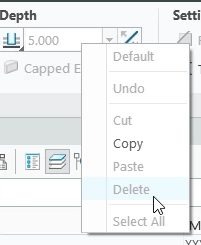
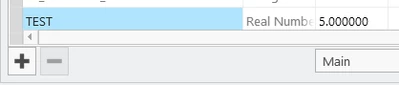
But how is it possible to remove this Parameter there? - Right mouse button "Delete" is greyed out" and the Paramter itself is also not deletable in the Parameter Manger. I just want to enter a value again in "Depth" not this parameter.

MP_9215870_1-1709553349774.png

MP_9215870_2-1709553384055.png


MikeBennett
17-Peridot
Mar 13, 2024 8:20 PM UTC

Hi @MP_9215870,


When adding a parameter as a value for an extrude depth, you should be prompted to set this definition as a feature relation:
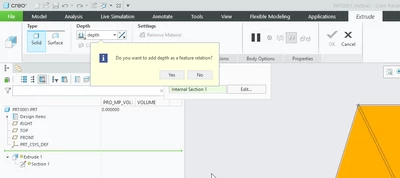
MikeBennett_0-1710360822605.png

This value will be locked by the relation and the parameter will also be protected from deletion as you have discovered.

You can find and delete this relation in Tools > Relations, Change the Look In dropdown to Feature, and select your Extrude feature. The relations associated with that feature will display and you can break this relation by deleting the line.  You could also choose another parameter if you are not happy with the initial parameter name.
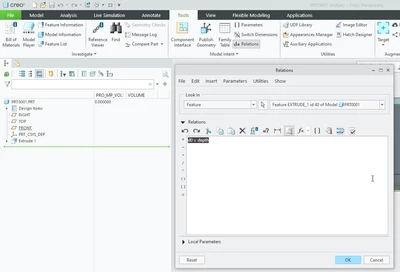
MikeBennett_1-1710360896484.png


Another way you would have found this is if you tried to use the Edit Mode on the feature.  The message log would have reported Dimension in <model name> is driven by the relation <d#=test>.  


The above information can also be found in CS180539 - Unable to modify dimension driven by relation in Creo Parametric.


Regards,

Mike

 

4 replies

StephenW
23-Emerald III
Mar 4, 2024 12:02 PM UTC

You have a relation that was made. Delete the relation first.

Translate
12-Amethyst
Mar 4, 2024 2:39 PM UTC

Pls tell me how to delete this relation - I cant find it 

Translate
tbraxton
22-Sapphire II
Mar 4, 2024 2:41 PM UTC

tbraxton_0-1709563269686.png


Translate