
12-Amethyst
October 10, 2024
Solved

Delete front after a drawing template update

  • October 10, 2024
  • 1 reply
  • 1393 views

Hi all,


After an upgrade in a drawing template, where i updated/deleted some symbols, annotations and change fonts.

But, it seems that an old fonts is still present, because i have the message "***.ttf.ndx is not loaded.

But for me, the annotations/ symbol which used this one are deleted.


How can i purge the drawing template for all the fonts unused?

I tried the options upadte_drawing all, the delete unused symbols options but without success.


How can i clean my drawings template for unused fonts?
 

Best answer by MartinHanak

Hi,

1.]

Check detail configuration options in template. Search old font name in the file.

2.]

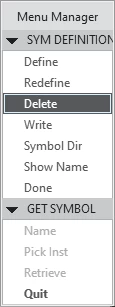
Annotate tab > Annotations group > Define Symbol > Delete > Name

MartinHanak_0-1728571409777.png

3.]

Upload your template to enable others investigate its contents.

1 reply

24-Ruby III
October 10, 2024

Hi,

1.]

Check detail configuration options in template. Search old font name in the file.

2.]

Annotate tab > Annotations group > Define Symbol > Delete > Name

MartinHanak_0-1728571409777.png

3.]

Upload your template to enable others investigate its contents.

12-Amethyst
October 10, 2024

Thanks Martin,


But I can't find the font in the detailed options (dtl file), and the symbol that contains the font has already been deleted.


I think i need to open a ticket 🙂

24-Ruby III
October 10, 2024

Hi,

it looks like your template is secrete one and you cannot upload it ...