Dale_Rosema
23-Emerald III
23-Emerald III
July 29, 2025
Solved

Delete part that is patterned does not delete all the pattern dimensions from a family table.

  • July 29, 2025
  • 1 reply
  • 361 views

I noticed recently ( I think it has been around awhile) that when you delete an entity that is patterned, it does not delete all the dimension of the pattern.


A part is patterned:
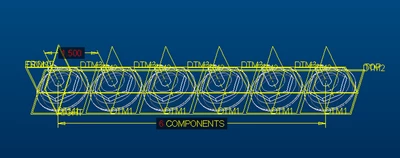
Dale_Rosema_0-1753821706474.png


A family table is made:

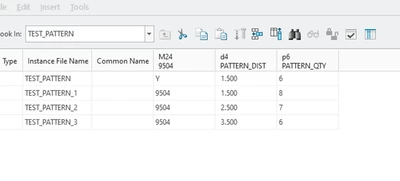
Dale_Rosema_1-1753821731727.png


I renamed the dimension (distance apart and qty) to try and avoid confusion:
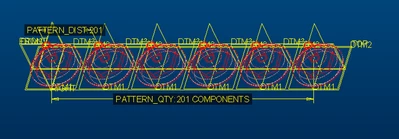
Dale_Rosema_2-1753821771592.png

Dale_Rosema_4-1753821942966.png

Next I deleted the part that was patterned (which deletes the pattern too).
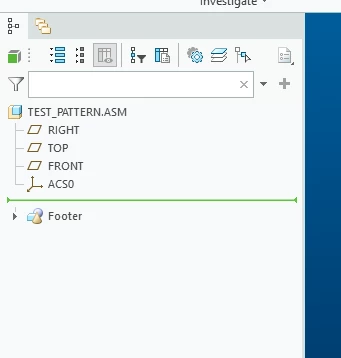
Dale_Rosema_5-1753821989183.png


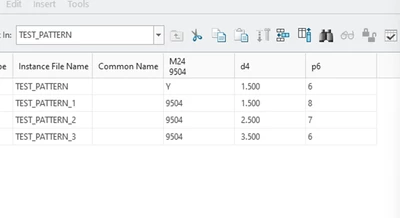
But the family table still shows the qty (and on a different one, it didn't get rid of the dimension):
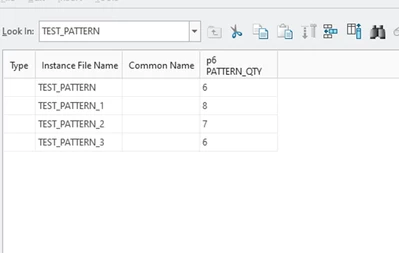
Dale_Rosema_6-1753822023256.png


Is this a glitch?

Best answer by Dale_Rosema

Since no one seems to have an issue with this, I am going to say the solution is:


When deleting a pattern part, first delete the pattern, then delete the part and you will not have any stray dimensions in your family table.

1 reply

Dale_Rosema
23-Emerald III
Dale_Rosema23-Emerald IIIAuthorAnswer
23-Emerald III
October 2, 2025

Since no one seems to have an issue with this, I am going to say the solution is:


When deleting a pattern part, first delete the pattern, then delete the part and you will not have any stray dimensions in your family table.