

Dale_Rosema
23-Emerald III
23-Emerald III
January 20, 2025
Question

Deleting a patterned part in an assembly

  • January 20, 2025
  • 1 reply
  • 790 views

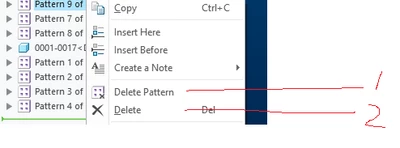
When deleting a patterned part you get (2) options "Delete Pattern" and "Delete".

If you are getting rid of the part completely, I have typically just chose "Delete".

When this is done, the family table has a orphaned dimension left in the table for the quantity of the pattern.

Why would the pattern quantity not be deleted also?
 

Dale_Rosema_0-1737397012568.png


1 reply

Dale_Rosema
23-Emerald III
23-Emerald III
January 20, 2025

My work around is to first delete the pattern.

Then delete the part.


I do not see why this needs to be done in this sequence.

KenFarley
21-Topaz II
January 20, 2025

I would presume you added the pattern quantity to the assembly family table. But, regardless, one would intuitively expect that if the first element is deleted, this should also delete the pattern, and thus the pattern quantity in the family table. Seems to be a programming error.

I wonder if it would go away if you regenerate after deleting the first member of the pattern.

In all honesty, though, I've always deleted the pattern and then the first element, in that order. Maybe long ago I had a bad experience, maybe it's just the way I've done it forever with no reason.

Dale_Rosema
23-Emerald III
23-Emerald III
January 20, 2025

It does not go away with the regeneration.

The column has to be physically deleted.