


Detail option view_note should match detail_circle_note_text
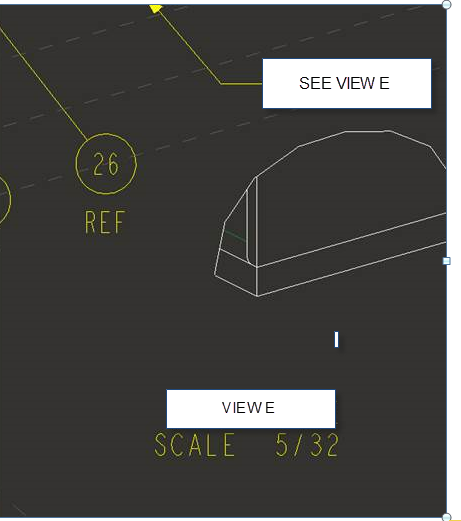
The .dtl option detail_circle_note_text when set to "DEFAULT" results in "SEE DETAIL" it can be set to another value such as "SEE VIEW" resulting in, you guessed it, SEE VIEW X attached to the leader. The problem is that the nomenclature attaced to the view itself will be DETAIL. The image below, courtesy of Steve C. Williams from PTC/User.org, illustrates the desired outcome.
The .dtl option view_note does not allow any customization. The only options available are std_ansi, std_iso, std_jis, std_din, std_gb & std_eskd. None of which will give the results shown below. To override the default you have to select the text, edit the properties and change the word "DETAIL" to "VIEW". My logic dictates that the settings should follow each other to be consistent, or the checker is going to let me know about it and besides I've got other things to do than change this every time I create a detailed view.
This thread is inactive and closed by the PTC Community Management Team. If you would like to provide a reply and re-open this thread, please notify the moderator and reference the thread. You may also use "Start a topic" button to ask a new question. Please be sure to include what version of the PTC product you are using so another community member knowledgeable about your version may be able to assist.