
1-Visitor
November 16, 2015
Question

Diameter Dimension - Single arrow leader

  • November 16, 2015
  • 6 replies
  • 5023 views

Is there a Drawing Option setting that would allow the default diameter leader to be the single outside point (like on the left) instead of the double inside (like on the right).

Currently, we have to double click and then middle click to create the .625 dimension, then you have to deselect, left click to re highlight and right click to flip the arrows.  90% of our diameter dimensions end up with the single arrow, so we would like this to be the default config option.

Thanks PTC Community!
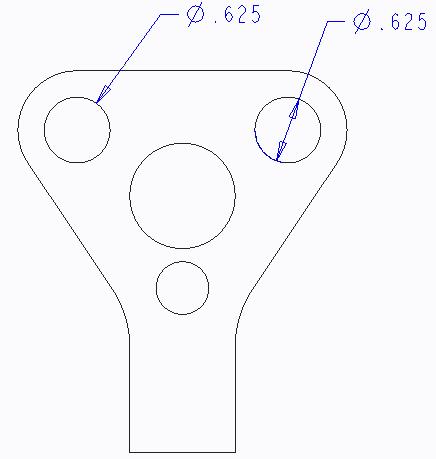
dia-arrows.JPG


This thread is inactive and closed by the PTC Community Management Team. If you would like to provide a reply and re-open this thread, please notify the moderator and reference the thread. You may also use "Start a topic" button to ask a new question. Please be sure to include what version of the PTC product you are using so another community member knowledgeable about your version may be able to assist.

6 replies

12-Amethyst
November 17, 2015

I am not sure about the config option but with the following method you can reduce the number of clicks

1. Select all the dimensions using the  smart window selection for dimensions ( it will select only the dimensions covered by the window)

2. Right click on the screen and select "Flip Arrows"

3. All diameter dimension will be as per your requirement

1-Visitor
November 17, 2015

Is there a config setting so it comes out standard that way?

1-Visitor
November 17, 2015

Thanks Praveen, but we know about the smart window and also the ctrl technique.  I'd rather skip those steps.

D'Hondt, it seems as if I'm not the only one asking for this to be standard.

StephenW
23-Emerald III
November 17, 2015

Just last month an idea was created for exactly this.

Add ability to set default diameter dimensioning

1-Visitor
November 17, 2015

Alright so you (Stephen) are saying there's no hope for a quick solution... Great.

It's odd that the location of the text relative to the leader line is a config option, but the arrow location is not...

StephenW
23-Emerald III
November 17, 2015

To the best of my knowledge, all hope is lost and now we are relying on a product enhancement suggestion that has a less than zero percent chance of being implemented.

Too bleak??? Well I voted on it so I guess maybe I still have a little hope but..........

6-Contributor
July 15, 2026

There is a setting in the drawing.dtl for this… default_diam_dim_arrow_state   single

KenFarley
21-Topaz II
July 15, 2026

This is a ten year old inquiry. The drawing file option has been, as far as I can tell, in place since Creo 4. It’s always been and still is a hidden option, though, so the only way people could use it is by manually editing their drawing.dtl file. Being hidden also means there’s no “official” documentation that I can find telling all the options.

I would guess that the idea didn’t go anywhere, huh?