
8-Gravel
January 25, 2023
Solved

Differences between drawing as displayed and as printed?

  • January 25, 2023
  • 2 replies
  • 1808 views

I'm having an issue with my drawings in Creo 9.

In the UI I'm able to get the drawing to look the way I want it to, with no hidden lines;
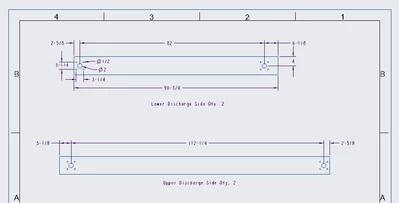
Drawing as displayed.png

However, when I print, one element of my assembly (and only this one) prints out with hidden lines shown:
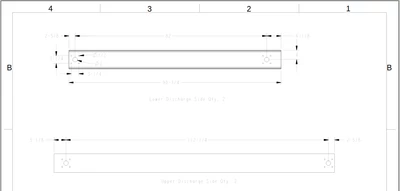
Drawing as printed.png

When I return to the Creo window after doing a quick export to .pdf format for printing, the troublesome element has bolded purple lines, which I assume is a clue to what's going on here, but I don't know what that means.
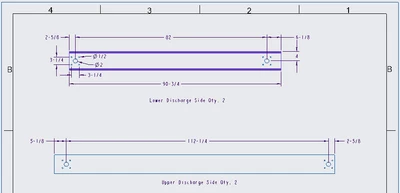
Dawing as displayed after export.png

Any idea what I've done here and how to correct it?

Thanks!

 

Best answer by kdirth

Purple usually indicates a surface feature.  The change in the view after a PDF export is unusual.  Are you using the menus to create the PDF or using a mapkey that may be performing other operations?

2 replies

kdirth
kdirth21-Topaz IAnswer
21-Topaz I
January 25, 2023

Purple usually indicates a surface feature.  The change in the view after a PDF export is unusual.  Are you using the menus to create the PDF or using a mapkey that may be performing other operations?

There is always more to learn.
8-Gravel
January 25, 2023

Thanks for pointing me in the right direction! Somehow I must have created a quilt out of the surface of the part; when I suppressed that it in the model tree it disappeared completely, which is not what I had expected it to do, but now the drawing renders as expected.