16-Pearl
March 24, 2020
Solved

dimension line

Hello,

Is there a way to eliminate a quota line?
Let me explain better (or at least I try), when I go to quote a model in the .drw, I would like that the horizontal line of the linear dimension inside the model is not seen.
Attached an example.

Is it feasible in your opinion?

Ty,

Matteo.

24-Ruby III
March 25, 2020

Hi,

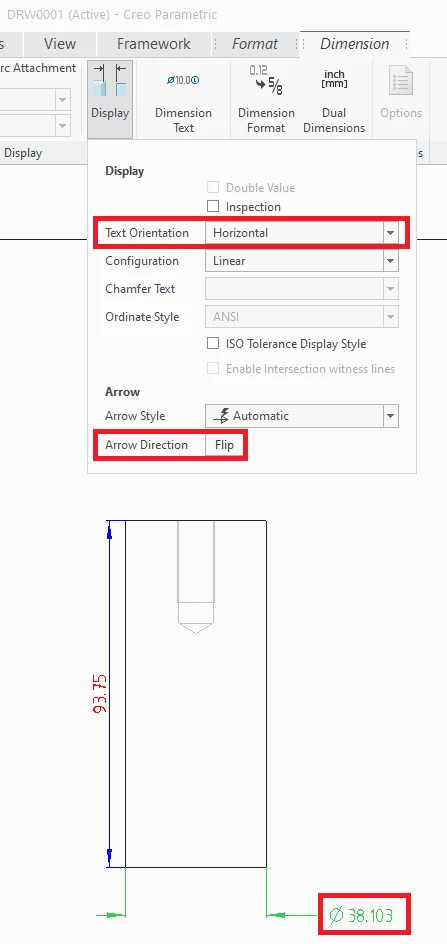
In Creo 5.0 I can

  • select dimension
  • set Text Orientation = Horizontal
  • click Flip button

NOTE: dimension value is not placed above the dimensioning line because of Horizontal orientation

dimension_line.png


2 replies

KenFarley
21-Topaz II
March 24, 2020

If I create a diameter dimension like this, the default is to have the line between the arrows. To get rid of the line, I select the dimension, keep holding down the left mouse button so the cursor changes to the four way arrows, then click and release the right mouse button (while still holding down the left mouse button) to change the arrow method.


Translate
24-Ruby III
March 25, 2020

Hi,

In Creo 5.0 I can

  • select dimension
  • set Text Orientation = Horizontal
  • click Flip button

NOTE: dimension value is not placed above the dimensioning line because of Horizontal orientation

dimension_line.png


Translate