1-Visitor
March 27, 2019
Question

Dimension symbols palette

  • March 27, 2019
  • 2 replies
  • 4237 views

Can anyone help me identify the path to the file containing the symbols for dimensioning?

I recently got a new pc and therefor reinstalled Creo4.0 M030.

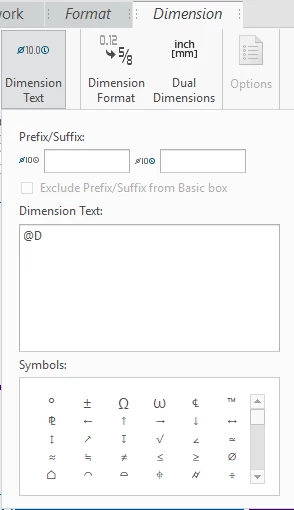
On my old pc the symbol palette looked like this:
OldOld

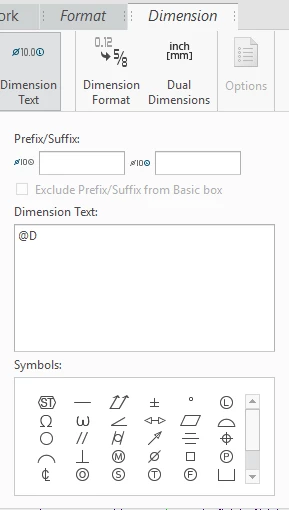
On the new pc it looks like this:

NewNew

As you can see I now have other symbols in the palette but also especially the diameter symbol "Ø" is significantly different and it stays different when I print the drawing as a PDF.


I have searched through config.pro and other .pro and .dtl files but I cannot find the location of these symbols.


2 replies

Mahesh_Sharma
22-Sapphire I
March 27, 2019

@mholst 

I think earlier you were using drawing option symbol_font as legacy in drawings and in new it is asme. 

If you will change the symbol_font drawing option in drawing to legacy, you will get old symbols. 


mholst1-VisitorAuthor
1-Visitor
March 27, 2019

I can find the symbol_iso.ttf and symbol_asme.ttf (font file) in my Creo directory but where do I make Creo use one or the other?

23-Emerald III
March 27, 2019

In your *.dtl file:

default_annotation_font <font_name>

1-Visitor
November 19, 2020

I am on the same task, to see if I can add to whatever file drives this pallet, and I have also noted changes to these symbols among Creo versions. So far, no one has come close to answering the open questions. I have a couple feelers out and will report here if I find anything.