
1-Visitor
September 12, 2019
Solved

Dimension Text Edit Unavailable Creo 6

  • September 12, 2019
  • 2 replies
  • 9467 views

I've started having issues with opening the dimension text window in the drawing tools. Any time I select the dimension text option on the ribbon, it shows it being selected, as shown in the image below, without the window opening. The window still comes up on the other engineer's workstation, so it's only an issue on my machine. Are there any menu options I can check to fix this, or do I just need to try a reinstall?


We are working with Creo Parametric 6.0
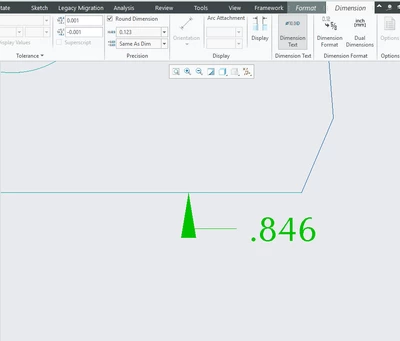
dim edit.PNG

Best answer by MartinHanak

Hi,

click File > Options > Windows Settings > Reset Panels´ Position.

2 replies

Dale_Rosema
23-Emerald III
23-Emerald III
September 12, 2019

For some reason, is you pop-up window behind the Creo main window? I have had that a couple of time with the print pop-up.

Engryan1-VisitorAuthor
1-Visitor
September 12, 2019

It doesn't appear to be, unless it moves with the main window when you move it across the screen.

24-Ruby III
September 13, 2019

Hi,

click File > Options > Windows Settings > Reset Panels´ Position.

Engryan1-VisitorAuthor
1-Visitor
September 13, 2019

You're a lifesaver, thanks!