
8-Gravel
February 20, 2025
Solved

Dimension Text - X after &P

  • February 20, 2025
  • 1 reply
  • 791 views

Hi,


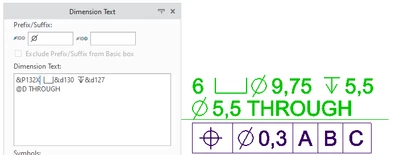
Having some issue trying to get dimension text to display as intended, I'm trying to get a custom hole note to show: 


6X etc etc......
 

IE_1_0-1740073212545.png


I'm using the hole &P number, but as soon as I try to put the X directly after &p132 it will not display.

I'm not sure what modifier I need to use, hopefully someone can help.


Thanks. 

Best answer by kdirth

Because you are not using spaces, Creo is assuming some type of formatting.


Try separating the &P with brackets:

{0:&P16}X&d13 ↧&d11
@D THROUGH

1 reply

kdirth
21-Topaz I
kdirth21-Topaz IAnswer
21-Topaz I
February 20, 2025

Because you are not using spaces, Creo is assuming some type of formatting.


Try separating the &P with brackets:

{0:&P16}X&d13 ↧&d11
@D THROUGH

There is always more to learn.
IE_18-GravelAuthor
8-Gravel
February 21, 2025

Thanks, that has solved my issue. Out of interest is there a guide anywhere that details all the text edits in CREO? 

kdirth
21-Topaz I
21-Topaz I
February 21, 2025

I knew that when Creo changes what you typed in it doesn't like the combination/format.  So, I tried separating the offending text.


Here is a discussion on text editing:


Tips for text - PTC Community

There is always more to learn.