3-Newcomer
Feb 28, 2023 9:22 PM UTC
Solved

Dimension units in drawings are not changing

I have gone into File -> Prepare -> Drawing Properties -> Detail Options then Drawing_Units and it is in Inches, the model is also in Inches but whenever I create dimensions for the drawings they are in mm. I have changed mm to inches everywhere and closed and restarted Creo and even made new views but the dimensions will not change from mm to inches.


Any help would really be appreciated,

Thanks


StephenW
StephenWAnswer
23-Emerald III
Mar 1, 2023 12:13 PM UTC

Just of note, the "drawing_units" option in the drawing properties doens't change a dimension from mm to inches, it changes the text heights (and other drawing parameter units) to mm or inches. 


Obviously missing something and without the actual files, it's difficult to troubleshoot. So let's do some random troubleshooting.

In the problem part, go to the analysis tab, select measure and select and edge. You should get a length that says inches? Hopefully. Just making sure part is in inches. If not inches, part units are the problem
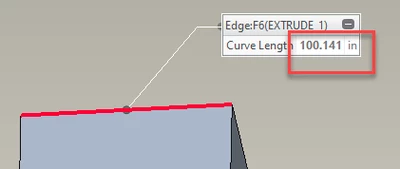
StephenW_1-1677671365153.png


Create a NEW drawing (if you have template options, make sure you pick one that uses inches), with that same part. Make a view, add a dimension. Dimension showing in inches or mm? If the units are MM, drawing is the problem (or picked drawing template)


It really is difficult to show mm on a inch part. That's why Tom asked about dual dimensioning option. Its the way you can show mm on an inch part.



9 replies

23-Emerald III
Feb 28, 2023 9:27 PM UTC

What release of Creo are you using?

Can you zip (drawing and model) and post your file here?


Translate
3-Newcomer
Feb 28, 2023 9:31 PM UTC

I am using Creo 8.0.2.0. I cannot post them but it is basically just a rectangle box that when I go to dimension the units are always in mm and I can't think of anywhere that I haven't changed to inches already. 

Translate
23-Emerald III
Feb 28, 2023 9:53 PM UTC

Is it just this one drawing or all drawings?

How long have you been using 8.0.4.0?

Did you check the defaults in your drawing template file and the .dtl file that is used for drawing defaults?

Translate
TomU
23-Emerald IV
Feb 28, 2023 9:30 PM UTC

Is dual dimensioning turned on?


TomU_0-1677619829188.png


Translate
3-Newcomer
Feb 28, 2023 9:37 PM UTC

No it is off

Translate
StephenW
23-Emerald III
Feb 28, 2023 9:53 PM UTC

You've check in the part, under file - prepare  - model properties for the units of the model.


StephenW_1-1677621188083.png


Translate
3-Newcomer
Feb 28, 2023 9:54 PM UTC

Yes, the entire assembly and all parts are in inches 

Translate
StephenW
StephenW23-Emerald IIIAnswer
23-Emerald III
Mar 1, 2023 12:13 PM UTC

Just of note, the "drawing_units" option in the drawing properties doens't change a dimension from mm to inches, it changes the text heights (and other drawing parameter units) to mm or inches. 


Obviously missing something and without the actual files, it's difficult to troubleshoot. So let's do some random troubleshooting.

In the problem part, go to the analysis tab, select measure and select and edge. You should get a length that says inches? Hopefully. Just making sure part is in inches. If not inches, part units are the problem

StephenW_1-1677671365153.png


Create a NEW drawing (if you have template options, make sure you pick one that uses inches), with that same part. Make a view, add a dimension. Dimension showing in inches or mm? If the units are MM, drawing is the problem (or picked drawing template)


It really is difficult to show mm on a inch part. That's why Tom asked about dual dimensioning option. Its the way you can show mm on an inch part.



Translate