
12-Amethyst
January 6, 2023
Question

Display an origin on a plane

  • January 6, 2023
  • 4 replies
  • 1518 views

Hello,


On my manufacturing plan for operators, i need to display the program origin for each operation so they can view which surface of the part they have to probe on the part.
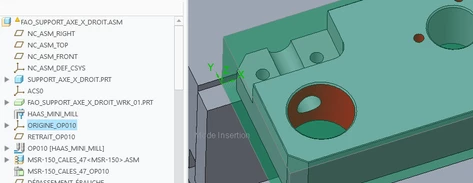
000988.png


The problem : On my plan, i can't permanently display the origin.
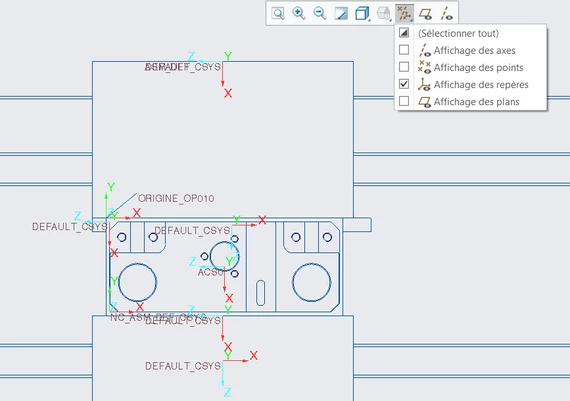
 

000989.png


when I uncheck the checkbox, all disapear and i can't select my origin "origine_OP010".


Do you have some ideas ? With annotations ?


Thanks in advance.

4 replies

tbraxton
22-Sapphire II
January 6, 2023

Use layers to control which csys features are displayed. Once you assign features to layers, then using show/hide layers to control what is displayed.


This should also be possible using combination states and annotations as an alternative if you prefer not to use layers.

RJ_FR12-AmethystAuthor
12-Amethyst
January 6, 2023

Hello,

Thanks for your answer but i don't know how to do that with "combination states and annotations".

Can you explain briefly ?

tbraxton
22-Sapphire II
January 6, 2023

This looks like you are creating inspection set ups for CMM or similar. Do you have the Creo manufacturing extension? This explains how to set up a reference csys for inspection.


https://support.ptc.com/help/creo/creo_pma/r9.0/usascii/index.html#page/manufacturing/cmm/to_create_a_new_reference_coordinate_system.html 

tbraxton
22-Sapphire II
January 6, 2023
14-Alexandrite
January 9, 2023

Hello


I put the symbol on the origin. I have created a symbol called origin_nc (attached). See if that makes a difference


Regards,

Pushkar