
12-Amethyst
Oct 23, 2023 2:51 PM UTC
Solved

DLS used confirmation message in Autodesk Vault Add-In for Creo

This Please confirm message comes up when download selected from the Vault Browser.  We would like this message to not appear at all.
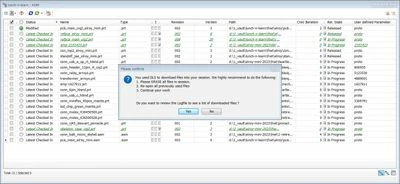
 

JM_10328182_0-1698072277099.jpeg


We are using Creo 7.0.4.0 and Autodesk Vault Pro 2022 with the 2022 Vault Add-In for Creo.

 

StephenW
StephenWAnswer
23-Emerald III
Oct 23, 2023 3:12 PM UTC

If this is an error generated by Autodesk Vault, you will likely have to get help from Autodesk

I can't see how it would be a Creo issue.

2 replies

StephenW
StephenW23-Emerald IIIAnswer
23-Emerald III
Oct 23, 2023 3:12 PM UTC

If this is an error generated by Autodesk Vault, you will likely have to get help from Autodesk

I can't see how it would be a Creo issue.

Translate
23-Emerald III
Oct 23, 2023 3:35 PM UTC

Check the download settings for the AutoDesk Vault to see if the message can be disabled. 

Creo is not generating that message, the vault software is.

Translate