
14-Alexandrite
August 26, 2021
Question

Don't show this to me again popups. How to remove for good?

  • August 26, 2021
  • 2 replies
  • 1433 views

Hi Guys,


We are using Creo 7.0.2.0


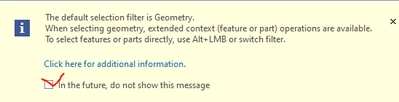
When I get these little info boxes, and I check off "in the future dont show this message"
 

dunebuggyjay_0-1629979568556.png


How can i save this so all the other users dont see these messages? Is this saved in the ribbon file?


We have about 30 seats of creo, and we all currently pull our files from the same central place on the network.


This makes it easier for me to update menu ribbons, mapkeys, etc etc. 


But these pop up info boxes are annoying everyone. LOL. 


Is there maybe even a place to just turn off ALL these info boxes all at once?


Thanks,

Jay

2 replies

23-Emerald IV
August 26, 2021

They are stored in the creo_parametric_customization.ui file.  It is possible to copy one of these to an admin file and place it in the loadpoint (where Creo is installed).  Take a look at these pages:


https://support.ptc.com/help/creo/creo_pma/r8.0/usascii/#page/fundamentals%2Ffundamentals%2Ffund_three_sub%2Fabout_saving_ui_custom_settings.html

https://www.ptc.com/en/support/article/CS37185

https://www.ptc.com/en/support/article/CS288341


24-Ruby III
August 27, 2021

@dunebuggyjay wrote:

Hi Guys,


We are using Creo 7.0.2.0


When I get these little info boxes, and I check off "in the future dont show this message"


dunebuggyjay_0-1629979568556.png


How can i save this so all the other users dont see these messages? Is this saved in the ribbon file?


We have about 30 seats of creo, and we all currently pull our files from the same central place on the network.


This makes it easier for me to update menu ribbons, mapkeys, etc etc. 


But these pop up info boxes are annoying everyone. LOL. 


Is there maybe even a place to just turn off ALL these info boxes all at once?


Thanks,

Jay


Hi,

you can also ask PTC Support.