4-Participant
September 16, 2024
Solved

dragging dimensions in edit mode

  • September 16, 2024
  • 4 replies
  • 6354 views

Hi,


How do I drag dimensions while in edit mode like this:

https://www.youtube.com/watch?v=kRxBD-B5IrY&t=49s


I attached a gif of me trying to drag sketch dimensions.

it doesn't matter if dimensions are weak, strong or locked.

I'm currently using Creo 8.


thanks

 

Best answer by StephenW

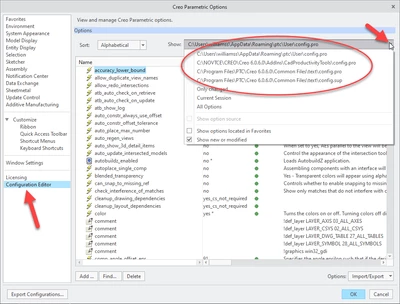
Maybe a bug, more likely a setting.

Try temporarily removing all config files. I typically just rename them with an X in front, but you can do it however.

Then restart Creo and retest. This will give you and "out of the box" test with no options set.

You can find all your config.pro files under file options configurations editor.


StephenW_0-1726571914050.png


4 replies

23-Emerald III
September 16, 2024

You can drag within the sketch or the dimensions can't be locked (i think your green dimensions are locked (rmb unlock on the dimension)

4-Participant
September 16, 2024

the dimensions are not locked. 

look at the new gif i attached.


I remember being able to do it when i worked with creo back in 2019...

did they change something?

tbraxton
22-Sapphire II
22-Sapphire II
September 16, 2024

They are dragging a dim of a sketch of the feature shown being flexed viewed in 3D. You can activate the sketch (modify dims) via the model tree to access the drag handles and dimensions while in a 3D view. Activate the sketch to show the dims and you can then LMB to select the sketch elements and drag.


@StephenW has noted that if the dims are locked in the sketch, then you would not be able to drag them. It looks like he has identified the issue you are having.


See this video. 

4-Participant
September 16, 2024

this is exactly what i am trying to do .

but i cant grab the dimensions.

i attached another gif

tbraxton
22-Sapphire II
22-Sapphire II
September 16, 2024

This may seem obvious, but I must ask. Do you have your selection filter set to dimensions when you are trying to select a dim for dragging?

kdirth
21-Topaz I
21-Topaz I
September 16, 2024

Getting the drag handle for a dimension is a bit difficult in edit mode.  You have to hover the mouse into an annoyingly small space over the arrow to get it show.  Dragging the lines, arcs, points, etc. is much easier.

There is always more to learn.
4-Participant
September 16, 2024

i can only grab the dragger for the extrusion, not the drawing dimensions/line/curves

see gif 


is it something in the config file?

tbraxton
22-Sapphire II
22-Sapphire II
September 16, 2024

Try selecting the numbers in the dimensions rather than the arrows and report back if that works. I am testing this in Creo 9, not Creo 10.

23-Emerald III
September 16, 2024

I'm on creo 6. 

I can drag the geometry if the dimension isn't locked. I am specifically selecting the geometry, not the dimension.

See video

StephenW_0-1726498203182.gif


4-Participant
September 16, 2024

tried that as well. didn't work

xtop_3clmSaYBMZ.gif