
3-Newcomer
October 31, 2023
Solved

Drawing ask for PRT template

  • October 31, 2023
  • 2 replies
  • 1264 views

Hello Everyone,


I have an issue with Creo regarding 2d drawing. I can create and do my 2d drawing without issue.


BUT... when I want to re-open my 2d drawing, it does not open and complain that the PART (.prt) template is not in the same directory:
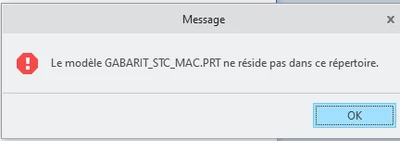
 

issue.png

Of course, my template is not in my working folder. The templates are on a shared folder.


If I copy the template .prt to my folder, I can solve the issue on open it... but it's not really convenient. The goal was to have all template on a shared folder so everyone can access to it when creating a new file.


Thank you for your help



Best answer by kdirth

Is your part template model assigned to the drawing?  If it is, delete the model from the Drawing Models.

2 replies

kdirth
21-Topaz I
kdirth21-Topaz IAnswer
21-Topaz I
October 31, 2023

Is your part template model assigned to the drawing?  If it is, delete the model from the Drawing Models.

There is always more to learn.
3-Newcomer
November 1, 2023

Thank you! I indeed have my part template in the the drawing. I removed it. 

tbraxton
22-Sapphire II
22-Sapphire II
October 31, 2023

There may not be enough context here to define the root cause but if @kdirth did not solve your problem then you should read about search paths. They may be relevant to your issue.


Example: Adding Search Paths (ptc.com)


More details on the configured environment and how you use your dwg and prt templates would be helpful if this remains unsolved.