
16-Pearl
December 12, 2017
Solved

Drawing axis orientation

  • December 12, 2017
  • 2 replies
  • 5936 views

Hello all,


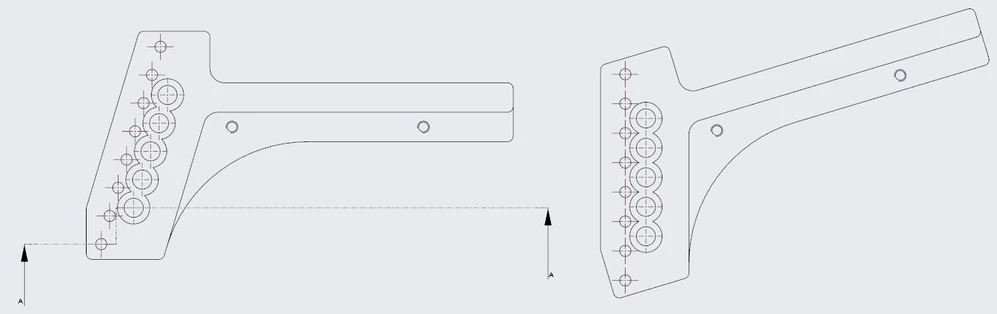
A question about drawings. Why hole axis are always orientend horizontal/vertical independently the way we created the holes ?

On the capture below as you can see hole axis are always horizontal/vertical. I would like to have axis orientend like the view on the right but on the left view. Is it possible ? Thanks
Capture_orientation_axes.PNG

Best answer by StephenW

You'll have to manually manipulate the axis by selecting the axis, right mouse button, edit attachment, and then in the old menu manager dialog, choose the option that will work the best for you. If you know the angle, you can manually enter it or you can have the axis orient parallel or normal to another picked line/edge or you can make the axis go thru other geometry.

2 replies

StephenW23-Emerald IIIAnswer
23-Emerald III
December 12, 2017

You'll have to manually manipulate the axis by selecting the axis, right mouse button, edit attachment, and then in the old menu manager dialog, choose the option that will work the best for you. If you know the angle, you can manually enter it or you can have the axis orient parallel or normal to another picked line/edge or you can make the axis go thru other geometry.

RaphMORIN16-PearlAuthor
16-Pearl
December 12, 2017

Thanks Stephen, it works juste fine !!

3-Newcomer
September 8, 2025

Why would you want this?  I am new to CREO but not new to CAD/CAM.  If I was going to create a drawing, I would want the view on the left.