13-Aquamarine
Oct 2, 2023 7:32 PM UTC
Solved

drawing BOM of assembly from imported STP file

I have a step file assembly imported into creo and the drawing BOM table sees it as a part. I cannot seem to correct this with any methods I am familiar with. 



StephenW
StephenWAnswer
23-Emerald III
Oct 31, 2023 12:46 PM UTC

@anthonyws 

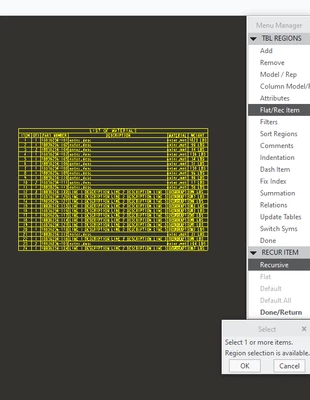
Go to the table table, then repeat region icon, then in the menu manager that pops up, hit Flat/Rec item and pick the table.

StephenW_0-1698756390361.png


7 replies

23-Emerald III
Oct 2, 2023 7:50 PM UTC

I am guessing that Creo is seeing it as a part file and not an assembly. In order for the repeat region BOM to see the assembly structure, your import will need to be seen as an assembly. 

Translate
anthonyws13-AquamarineAuthor
13-Aquamarine
Oct 30, 2023 9:45 PM UTC

Yeah, That's what I see but how to do that is the question. I was able to sort of drag the assembly up the list and expand the features (I think I moved the features out of the imported assembly.) I tried a bunch of things and got it to work but without a clear understanding of what is happening, I don't have confidence it'll be repeatable in a reliable way. I'll have to google around. Cheers

Translate
StephenW
23-Emerald III
Oct 3, 2023 10:57 AM UTC

When I import step files, I usually get an extra level. So to generate a BOM on a drawing, I would need to either add the model to the drawing that has the structure as I want to see it or  set the bom item(s) in the table as recursive so it goes down to the level I need.

Translate
anthonyws13-AquamarineAuthor
13-Aquamarine
Oct 30, 2023 9:47 PM UTC

I do remember the recursive trick from some training but for the life of me I cannot find it. It was nested in a dropdown I remember. 

Translate
StephenW
StephenW23-Emerald IIIAnswer
23-Emerald III
Oct 31, 2023 12:46 PM UTC

@anthonyws 

Go to the table table, then repeat region icon, then in the menu manager that pops up, hit Flat/Rec item and pick the table.

StephenW_0-1698756390361.png


Translate
1-Visitor
Nov 1, 2023 5:06 AM UTC

Hello,

To resolve the issue of Creo recognizing a STEP file assembly as a single part, verify component identification, check file structure, review assembly constraints, configure the BOM, and consider re-importing.


I hope this will help you.

Thanks.

Translate