13-Aquamarine
November 16, 2022
Solved

Drawing store sheet number / copy sheet

  • November 16, 2022
  • 2 replies
  • 6014 views

Hello,


I want to create a mapkey to copy a sheet and then come-back to the original sheet.

I imagine to use the parameter sheet_number but i don't know how to store its value.


Do you have any idea ?

Thanks

Best answer by MartinHanak

Hi,

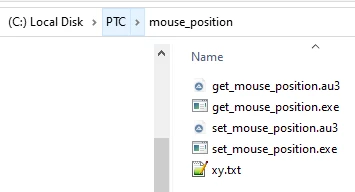
I created Autoit scripts + mapkeys. This "thing" works in Creo 7.0.5.0 for drawing with 2+ sheets.
MartinHanak_0-1668775785849.png

mapkeys:

mapkey x1 @SYSTEMstart "" "C:\\PTC\\mouse_position\\get_mouse_position.exe";

mapkey x2 ~ RButtonArm `main_dlg_cur` `switcher_lay_buttons_lay_ph.page_1` 0 \
mapkey(continued) ``;\
mapkey(continued) ~ Trail `UI Desktop` `UI Desktop` `SmartTabs` `selectButton \
mapkey(continued) main_dlg_cur@switcher_lay_buttons_lay page_1 0`;\
mapkey(continued) ~ PopupOver `main_dlg_cur` `PM_switcher_lay_buttons_lay_ph.tab_container` 1 \
mapkey(continued) `switcher_lay_buttons_lay_ph.page_1`;~ Command `ProCmdDwgMoveCopySheets` ;\
mapkey(continued) ~ Activate `movesheet` `ChkCopy` 1;~ Activate `movesheet` `OK`;

mapkey x3 @SYSTEMstart "" "C:\\PTC\\mouse_position\\set_mouse_position.exe";

mapkey xx %x1;%x2;%x3

usage:

  • select sheet tab (its name is displayed with bold characters)
  • type xx on keyboard to run mapkey


2 replies

tbraxton
22-Sapphire II
22-Sapphire II
November 16, 2022

You will need to use a command that it is not in the ribbon. Use the command search to find it (magnifying glass in the ribbon). Invoke that command and record the mapkey with the sheet numbers. I would make a nested mapkey starting with one that invokes this command to bring up the window.


This is the window for the command that will appear.


tbraxton_0-1668615479667.png


Nicolas_G13-AquamarineAuthor
13-Aquamarine
November 16, 2022

Thanks,


Is there a possibility to use this command without manually enter the sheet number?


For example:


My drw have 5 sheets. I want to

create a copy of sheet 2 (creo goes on copy sheet) and automatically comeback on sheet 2.

create a copy of sheet 4 (creo goes on copy sheet) and automatically comeback on sheet 4.

I want to be able to do the same with any sheet of any drawing.

tbraxton
22-Sapphire II
22-Sapphire II
November 16, 2022

This is not possible with mapkeys only. Mapkeys do not generally support programming logic functions such as variables, a stack or register etc.

User defined variables at run time are possible with mapkeys in some cases where the UI supports this by pausing for user input. I think the best you will do with strictly a mapkey is to invoke the go to sheet UI and then enter the sheet number.


There are some methods to create mapkeys on the fly using variables, but it may not be worth it in terms of time saved as you will need to use some other programming tool to write the sequence and load it into Creo in real time. There are also ways to implement a toggle function using mapkeys by dynamically defining them within a mapkey sequence. This is not a true toggle as the mapkey is never aware of the current state.


The toggle mapkey trick would work but only for one set of two page numbers (i.e 1&4), if you need to do this on the fly by changing the page numbers you will need to run an external script which is probably not saving you time.


If this something you really need for productivity, then I would look to one of the Creo APIs to implement this. I would suggest writing pseudo code for what you need to happen and then looking at the API function calls.


I would look at the  Tookit API first, if it does not have an API call to switch sheets then most likely none of the other APIs have it either.


24-Ruby III
November 18, 2022

Hi,

I created Autoit scripts + mapkeys. This "thing" works in Creo 7.0.5.0 for drawing with 2+ sheets.

MartinHanak_0-1668775785849.png

mapkeys:

mapkey x1 @SYSTEMstart "" "C:\\PTC\\mouse_position\\get_mouse_position.exe";

mapkey x2 ~ RButtonArm `main_dlg_cur` `switcher_lay_buttons_lay_ph.page_1` 0 \
mapkey(continued) ``;\
mapkey(continued) ~ Trail `UI Desktop` `UI Desktop` `SmartTabs` `selectButton \
mapkey(continued) main_dlg_cur@switcher_lay_buttons_lay page_1 0`;\
mapkey(continued) ~ PopupOver `main_dlg_cur` `PM_switcher_lay_buttons_lay_ph.tab_container` 1 \
mapkey(continued) `switcher_lay_buttons_lay_ph.page_1`;~ Command `ProCmdDwgMoveCopySheets` ;\
mapkey(continued) ~ Activate `movesheet` `ChkCopy` 1;~ Activate `movesheet` `OK`;

mapkey x3 @SYSTEMstart "" "C:\\PTC\\mouse_position\\set_mouse_position.exe";

mapkey xx %x1;%x2;%x3

usage:

  • select sheet tab (its name is displayed with bold characters)
  • type xx on keyboard to run mapkey


Nicolas_G13-AquamarineAuthor
13-Aquamarine
November 18, 2022

Thanks,


very interesting.

I will try.
