


Solved
Drawing Tables - New Table Row Text Size and Alignment
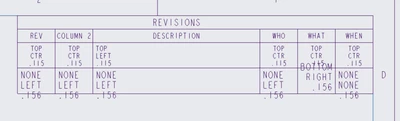
I have a table that we use to capture Rev History. Whenever we add a row to this table, the text size and text alignment does not carry the alignment from the previous row. Is there a way to set it the text size and alignment (or even style) for each column so that newly added rows don't need to be specifically defined?
The first row under the headers shows how I want ever added row to behave. The second row shows what I am currently getting in regards to Vertical Alignment, Horizontal Alignment, and Text Size.
Currently using Creo 10.0