
1-Visitor
September 2, 2015
Question

ECAD MCAD Collaboration

  • September 2, 2015
  • 1 reply
  • 3431 views

Hi,

I am working with ECAD MCAD collaboration module. I find options like set as accept, set as reject are greyed out. What could be the possible reason?

I use Creo Parametric 2.0. I tried with both View 2.0 & 3.0 M031.

--

Dhinesh
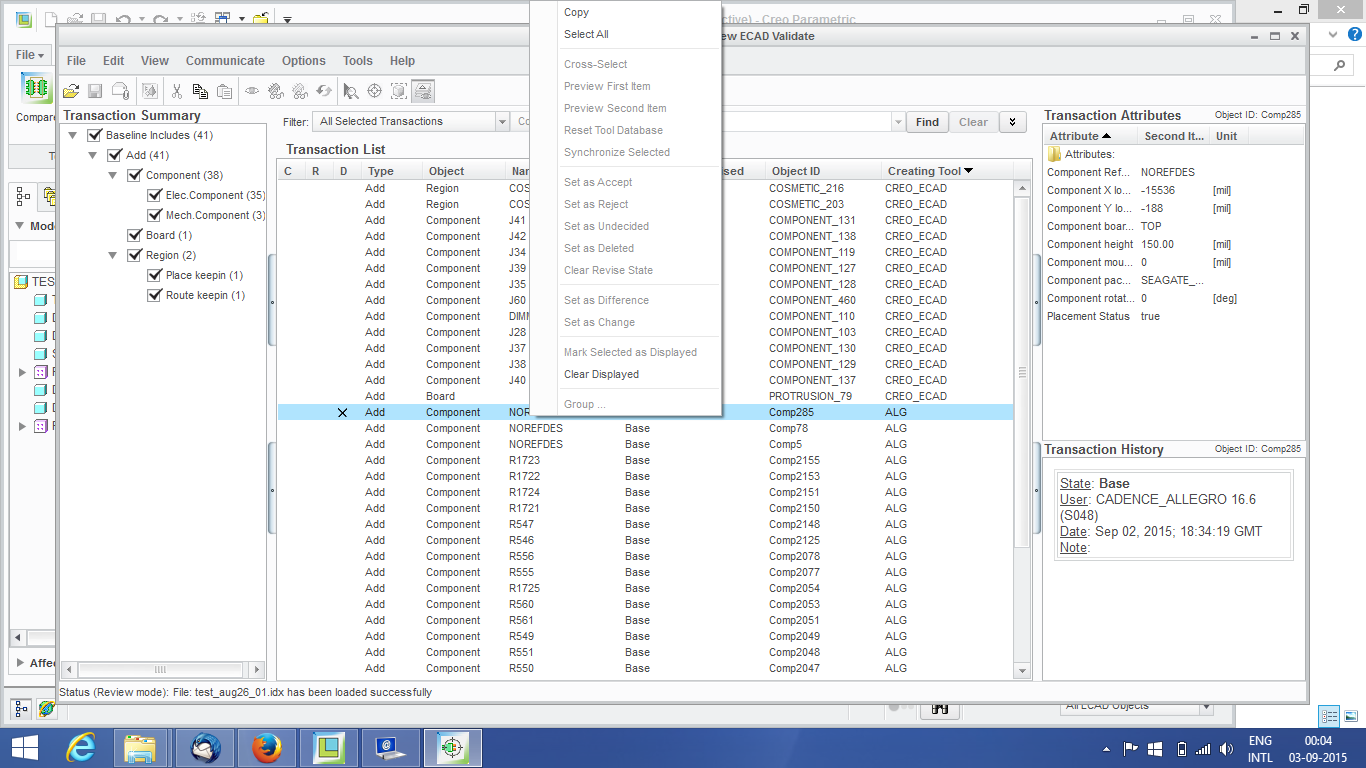
view validate.png


This thread is inactive and closed by the PTC Community Management Team. If you would like to provide a reply and re-open this thread, please notify the moderator and reference the thread. You may also use "Start a topic" button to ask a new question. Please be sure to include what version of the PTC product you are using so another community member knowledgeable about your version may be able to assist.

1 reply

1-Visitor
September 7, 2016

Hi Dhinesh,

Did you ever find a solution to this problem? I have exactly the same problem. If you found a solution, could you please forward it to me at msodoma@gnresound.com? We are using Creo 3.0, M040 and Creo View 3.1, F000. (I tried using Creo View 3.0, M031, but that did not work either.)

Thanks,

Mark

dm-31-VisitorAuthor
1-Visitor
October 19, 2016

The Allegro file is a baseline IDX and does not allow preview, cross-select, or accept/reject for that type of IDX file. Only incremental IDX files will have this functionality enabled.
In Creo View you can open baseline IDX to see what it looks like.

Marco Tosin
21-Topaz I
21-Topaz I
October 19, 2016

What do you mean with incremental?

IDX = Incremental Data eXchange (see below link)

IDF, IDX

Marco