


23-Emerald III
June 10, 2017
Solved

Edit Attachment on non-circular detail view label

  • June 10, 2017
  • 3 replies
  • 4642 views

On a non-circular detail view label, I have to use "edit attachment" to move the arrow placement.

Is there something I'm missing? It's an annoyance that frustrates me to no end.

The little black grab handle is there, it looks like you can grab and move the attachment, but you can't. You have to right mouse on the leader, edit attachment.
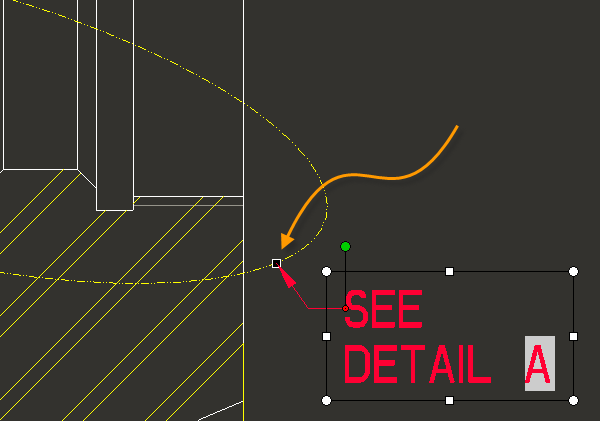
There is a million of these frustrating little things in drawing mode.


I'll post a IDEA if...

Best answer by mender

Historically, before handles and graphical manipulation, you needed to enter a command of some sort to say what you wanted to do.  Because the leader does not need to be attached normal to a circle, we had two distinct actions:  Move the note, and move the arrow point.  These got handled by the commands Move and Move Attach respectively.  The graphical manipulation handle on the arrow point sounds to me like it ought to be able to move the attachment.  My guess is that we didn't contemplate this case specifically when making the new UI, and the code that generically works on leaders to edges/surfaces/axis-lines/datum-curves/draft-entities/etc/etc does not happen to work on this case.

I don't think you need a Product Idea here.  I would recommend filing an SPR, that dragging the box at the arrow point on this note ought to be able to move the attach point.

3 replies

mender12-AmethystAnswer
12-Amethyst
June 11, 2017

Historically, before handles and graphical manipulation, you needed to enter a command of some sort to say what you wanted to do.  Because the leader does not need to be attached normal to a circle, we had two distinct actions:  Move the note, and move the arrow point.  These got handled by the commands Move and Move Attach respectively.  The graphical manipulation handle on the arrow point sounds to me like it ought to be able to move the attachment.  My guess is that we didn't contemplate this case specifically when making the new UI, and the code that generically works on leaders to edges/surfaces/axis-lines/datum-curves/draft-entities/etc/etc does not happen to work on this case.

I don't think you need a Product Idea here.  I would recommend filing an SPR, that dragging the box at the arrow point on this note ought to be able to move the attach point.

StephenW23-Emerald IIIAuthor
23-Emerald III
June 11, 2017

Thanks Matt. I'll do that.

StephenW23-Emerald IIIAuthor
23-Emerald III
June 12, 2017
12-Amethyst
July 26, 2017

Update on this:  you'll need to put up with the workaround for a bit longer, as we missed the cutoff for M140, but you can look forward to it in M150.

StephenW23-Emerald IIIAuthor
23-Emerald III
July 26, 2017
That's great news! Thanks for the effort!