Dale_Rosema
23-Emerald III
23-Emerald III
June 20, 2024
Solved

Edit Custom Symbols

  • June 20, 2024
  • 2 replies
  • 1458 views

I have some old custom symbols that I have used throughout the years. Did something change in Creo 9 as to how the parameters are edited/filled in?

If I load the template custom symbol, I do not get the various parameters to fill in (or at least I am not aware of their presence).

When I copy and paste a custom symbol from another drawing to a new drawing, I cannot find a way to edit the value of the parameter. When I go to redefine, this is the name of the parameter shown.


\fillet_leg1_OS\x\fillet_leg2_OS\

value on old: 4X EQ


Dale_Rosema_0-1718896264305.png


Best answer by Dale_Rosema

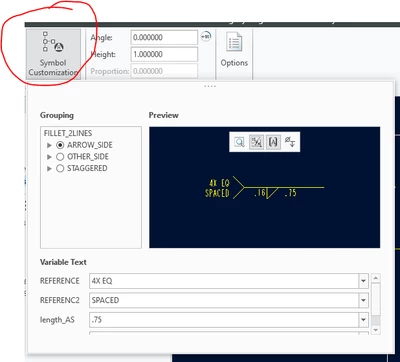
Found it!!!

(Although not very intuitive - gasp)


I thought it would pop-up if you right clicked on the note.


Dale_Rosema_0-1718898040575.png


Thought the circle part was a header and not a button.

2 replies

Dale_Rosema
23-Emerald III
23-Emerald III
June 20, 2024
Dale_Rosema
23-Emerald III
Dale_Rosema23-Emerald IIIAuthorAnswer
23-Emerald III
June 20, 2024

Found it!!!

(Although not very intuitive - gasp)


I thought it would pop-up if you right clicked on the note.


Dale_Rosema_0-1718898040575.png


Thought the circle part was a header and not a button.

Patriot_1776
22-Sapphire II
June 22, 2024

'Sup Dale!  Yeah, I struggled with that at first as well.  I do NOT like this new interface.  But, since they don't ever give us any new functionality anymore, I guess we're stuck with them re-arranging things and touting "Bold New Graphics!"  LOL


In general, I find making complex symbols in Creo much harder than in AutoCAD.  Ah well...