

1-Visitor
February 7, 2014
Solved

Editiable annotations/dimensions

  • February 7, 2014
  • 2 replies
  • 9878 views

Hello all,


I have setup a gear within creo and displayed the editable parameters as annotation. The attached picture explains this a little better. My problem is, I can't seem to figure out how to make the annotations clickable so that the values of the parameters can be changed. I want to be able to change the values of the annotated parmeters under the model tab. I have seen this done before, so I know it should be possible. I just cant seem to figure out how. Any help is much appreciated.


This thread is inactive and closed by the PTC Community Management Team. If you would like to provide a reply and re-open this thread, please notify the moderator and reference the thread. You may also use "Start a topic" button to ask a new question. Please be sure to include what version of the PTC product you are using so another community member knowledgeable about your version may be able to assist.
Best answer by neomechanikos

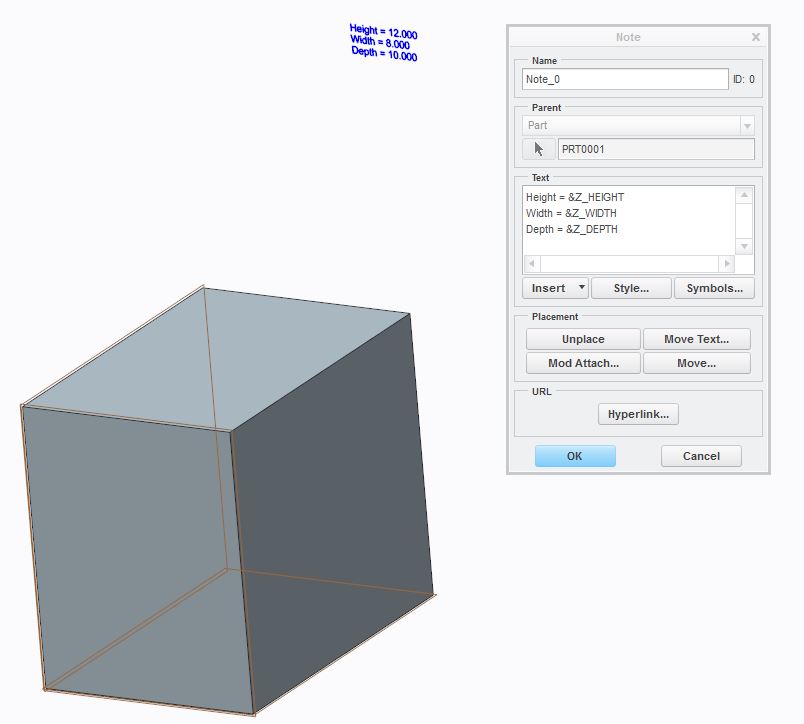
To do it in the part model, create an annotation note and reference your parameters with a &. See image below. When you double-click the annotation in the model, it will prompt you for the value of the parameter you double-clicked.

annotate.JPG

Edit: I should clarify that the parameters in the image above are named z_height, etc. Doing this in a drawing would be very similar.

2 replies

1-Visitor
February 7, 2014

To do it in the part model, create an annotation note and reference your parameters with a &. See image below. When you double-click the annotation in the model, it will prompt you for the value of the parameter you double-clicked.

annotate.JPG

Edit: I should clarify that the parameters in the image above are named z_height, etc. Doing this in a drawing would be very similar.

napier1-VisitorAuthor
1-Visitor
February 13, 2014

This puts the annotation within the model, however I still can not click it to edit the parameters.

1-Visitor
February 13, 2014

It works on my end. A few things to check:

  • Do you have a filter applied in the bottom right corner of your screen? It should be set to smart.
  • What version of Creo are you running?
  • Are the parameters in your model or a subassembly or another model?
  • Does the & show up in the annotation when viewing it from the model?
  • Do you have a relation that drives and defines these parameters?
  • Are you double-clicking the value of the parameter you want to change? A small window at the top of the screen should open up, asking you to enter a new value. If you click on another word in the annotation, it won't work.
1-Visitor
March 6, 2014

go to model tree setting, display annotation, apply,ok, Annotation will show up on the top of model tree, then you can do what you want!

1-Visitor
April 14, 2016

Just moved to Creo3, and now when I try to modify a parameter value, the value changes to text and the parameter does not change!

Is this a bug or has something changed?