

1-Visitor
January 14, 2019
Solved

Exclude one item from the Repeat Region Table

  • January 14, 2019
  • 2 replies
  • 3441 views

Hi,


I need help with understanding, how to exclude one item from my Repeat Region Table/

I have hidden one part from my assembly in every view, which is okay.


But my autogenerated BOM table still have all parts.

How to change it to exclude unwanted items and get new numbering within this table?
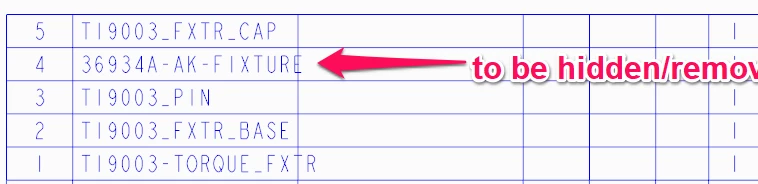
 

BOM table 01.png


Thank you,

Arek


Best answer by TomU

Table Tab:

Repeat Region --> Filters (select the table) --> By Item (select the row(s) to hide) --> Ok --> Done -->Done -->Done.

2 replies

TomU23-Emerald IVAnswer
23-Emerald IV
January 14, 2019

Table Tab:

Repeat Region --> Filters (select the table) --> By Item (select the row(s) to hide) --> Ok --> Done -->Done -->Done.

StephenW
23-Emerald III
January 14, 2019

Table - Repeat Region - Filter - (choose bom table) - By Item - Exclude and you can choose the line you want to exclude.