

Exclude pattern members based on external input
I'm trying to automate the process of setting up an assembly which has a configurable pattern of components of which a number of members need to be excluded.
A customer can choose any number of rows and columns for the green rectangles A.
The bigger rectangle B can change position and size (or not be there at all) and is the region which should not be filled with rectangles A.
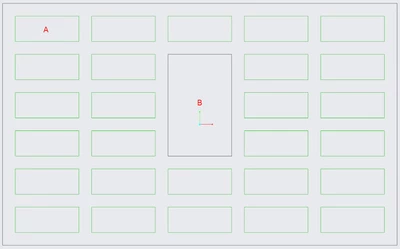
Manually this can easily be achieved by making a Direction Pattern and clicking each dot that falls in region B. However I want to automate this and create the pattern based on input parameters.
Fixed values: size of A, spacing in X and Y direction between rectangles A.
Input parameters: number of instances in X and Y direction of A, position and size of rectangle B
Explored options:
- Fill Pattern: would be the perfect solution except for the fact that the spacing in X and Y directions is always equal. Which is not the case for us.
- Table Pattern: If necessary it could be possible to create a table with all coordinates of the members in the pattern outside of Creo. However I can't find a way to use an external table or use the input parameters to fill an internal table to create the pattern.
What I would like is to have a parameter that is a list of members to be excluded and feed this to the pattern. Or combination between a fill and direction pattern where I can easily sketch the excluded area while still having full control over the different pattern directions.
Anyone has any ideas?