
12-Amethyst
April 1, 2025
Solved

Exit Countersink in hole shape not showing up

  • April 1, 2025
  • 3 replies
  • 1940 views

I am running Creo 10.0.6.0 in combination with a CAD management system, OpenBom we are going to be moving to a better system Windchill or team centre.We also use Github to share config files.

I found that I could add exit counter sinks to holes something that we had not used so instead had an unattached note added to a hole note stating both sides for a double countersink.

We use a combination of simple holes which I also parametrized and ISO standard holes.  

In this image it shows the exit countersink option greyed out as its not a through hole which I understand
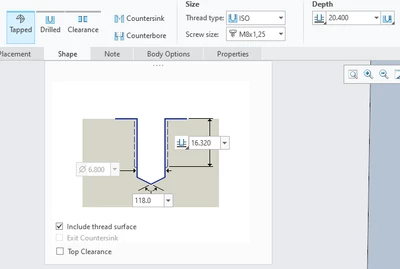
MB_10049474_0-1743514850767.png

In this image that option is gone, Why?
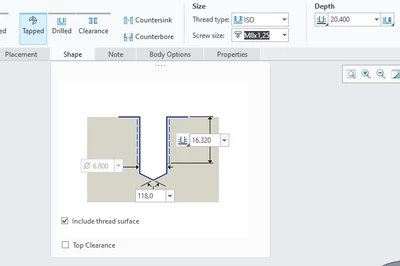
MB_10049474_1-1743515023022.png

I am in 2 different sessions both in Creo 10.0.6.0. The first image was taken with a part outside OpenBom and the second was in OpenBom, though I don't think that will affect anything

I initially thought that it was due to Creo versions but when I updated to Creo 10.0.6.0 from 10.0.3.0 on a test laptop it did not have the option.


What is defining whether exit countersink option is present in the hole shape?

Best answer by MB_10049474

I think I see where I am going wrong the placement type is set to sketched and not on point. My process for making holes is to make a sketch with datum point(s) and then make a hole when the sketch is selected using a map key which I have set as "HO". I will need to modify this map key to change the type to on point.

When highlighting a sketch and then making a hole it automatically set the type to sketched whereas if you select a point instead the hole type becomes on point allowing exit counter sinks.    

3 replies

17-Peridot
April 1, 2025

Countersink and Counterbore options are not greyed out. They look the same for me in Creo Parametric 7080 and 1060. They are still selectable. Just click on them.

kdirth
21-Topaz I
21-Topaz I
April 1, 2025

You must set your depth to thru all to get that option

There is always more to learn.
12-Amethyst
April 1, 2025

That does not help as this hole is set to a depth of thru all and that exit countersink option is not present

MB_10049474_1-1743519825628.pngMB_10049474_2-1743519844607.png


kdirth
21-Topaz I
21-Topaz I
April 1, 2025

Do you have a Hole orientation set in the placement tab?  This setting appears to disable an exit countersink

There is always more to learn.
13-Aquamarine
April 1, 2025

From Help file...

aputman_0-1743541825365.png


19-Tanzanite
April 1, 2025

yeah, but in all those cases, this option is "grayed out".  I don't know what would cause it to "disappear" from the UI.

13-Aquamarine
April 1, 2025

It's missing for me in Creo 8 in assembly mode.   

Edit: Creo 11 is also missing (not grayed).

aputman_0-1743542297272.png