
14-Alexandrite
January 14, 2017
Question

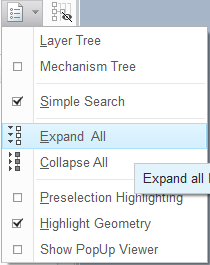
Expand All

  • January 14, 2017
  • 1 reply
  • 2790 views

14-01-2017 11-39-12.png

Hi

Is there any possible way to delete or move this option  "Expand All" from this model tree menu?

I constantly work with very large assemblys, and it happens a lot, when i want to collapse all features, i miss the button and end clicking on "Expand All"

This results on long waits, sometimes 5 minutes or more before i can continue working

Thanks!

    1 reply

    16-Pearl
    January 16, 2017

    As an alternate approach you could create a mapkey to execute the collapse all and expand all.  For the expand all mapkey, first go to the model tree filters and uncheck the "excluded objects" items in the model tree.  You will be surprised how useful the expand all is when you only show the items that are active in the model tree.

    Capture.JPG

    hdasilva14-AlexandriteAuthor
    14-Alexandrite
    January 16, 2017

    Thats a good Idea 

    I will try it!

    Thanks