2-Explorer
August 16, 2019
Question

(Explode) Offset Line Jog Position

  • August 16, 2019
  • 2 replies
  • 3549 views

There must be a way I can adjust the position of the Jog in my Offset Line...

I try to drag the Handle but it always snaps back to the original position.  

What's the trick?

Thanks
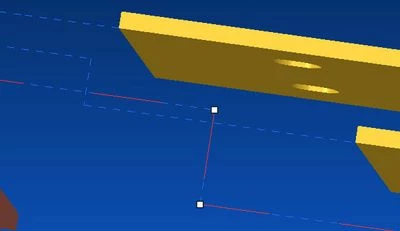
8-16-2019 9-31-22 AM.jpg

2 replies

24-Ruby III
August 19, 2019

@doneill wrote:

There must be a way I can adjust the position of the Jog in my Offset Line...

I try to drag the Handle but it always snaps back to the original position.  

What's the trick?

Thanks

8-16-2019 9-31-22 AM.jpg


Hi,

I guess that your problem is "data dependent". Please can you upload Creo file and picture explaining what goal do you want to achieve?

doneill2-ExplorerAuthor
2-Explorer
August 20, 2019

In my picture you can see the highlighted Jog... I want to move it to the left of the shorter Jog.  As I mentioned in the original post... when I try to drag it, it just snaps back to the original position.  From other posts, it looks like his is a common problem with no solution.  I was hoping someone had a solution by now.  

kdirth
21-Topaz I
21-Topaz I
August 20, 2019

The lines are snapping to right angles.  Moving the point far enough away from right angle it will stay where you drag it to.  The only way I have found to make the small moves is to move the opposite point well beyond the snapping limit, move the point to where you want it, and return the opposite point back.


Would be nice if they would add a function to disable snapping.  The Shift key is used in other functions to disable automatic constraints.  This would be a good suggestion to submit in the CREO Parametric ideas.

There is always more to learn.
15-Moonstone
October 25, 2023

Hi,
set the "offset line snap accuracy" option in the config and reduce its value, default is "10", for example "offset line snap accuracy 5"
See PTC case S163990.

P.S. I think it's an old option from the old Wildfires, it's not even present in the config guide that I downloaded from the PTC site, but I use Creo 9.0.5.0 and it works.