

10-Marble
May 22, 2019
Solved

Export a pvz file with textures

  • May 22, 2019
  • 1 reply
  • 3761 views

I have a Creo model which I want to save as a .pvz and include textures. 


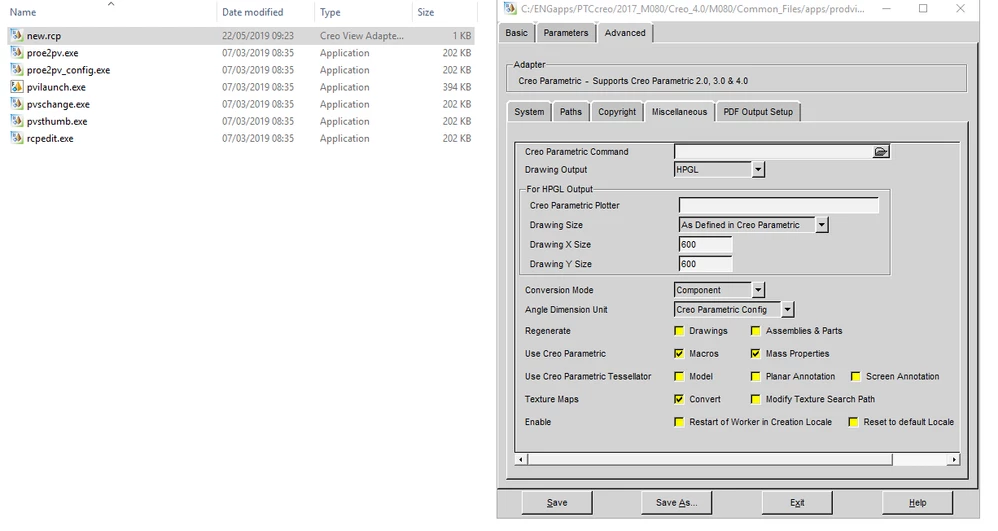
I have created a recipe file called new.rcp which has 'Convert' selected under 'Texture Maps' (as advised in CS75925)
 

Annotation1.png

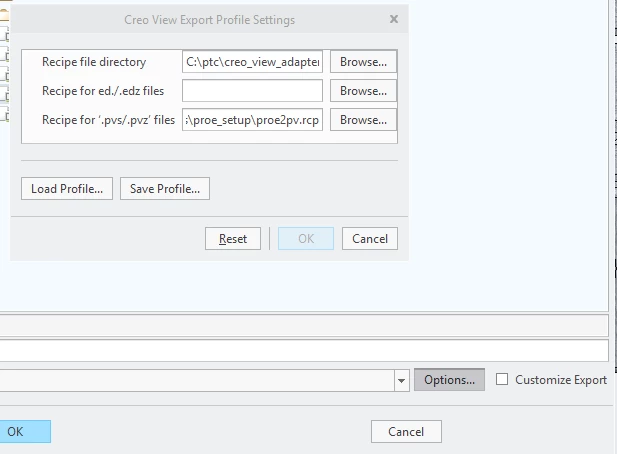
Within Creo, under 'Save As' I selected .pvz and then click 'Options' and add the directory where this recipe file is located. I also add the recipe file itself under 'Recipe for .pcz'.
Annotation3.png

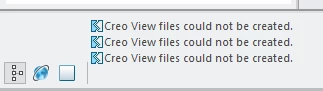
However when I hit Save I get 'Creo View files could not be created'.
Annotation4.png


Can anyone advise where I'm going wrong

Best answer by MartinHanak

Hi,

I can see hpgl.png in recipe editor window. I do not think that this data format is the right one.

1 reply

24-Ruby III
May 22, 2019

Hi,

I can see hpgl.png in recipe editor window. I do not think that this data format is the right one.

rhudd10-MarbleAuthor
10-Marble
May 23, 2019

Hi Martin,


I've since found that without specifying any recipe file (i.e. just using the default recipe file) Creo was exporting the textures. I thought it wasn't because they didn't appear when I opened the model in Creo View. The problem was I had applied the textures at assembly level and they needed to be applied at part level to be exported.


Before it was discovered this was the problem I had started to investigate recipe files as I thought the default option was to not export textures. Whether I'm wrong on this or whether my company has changed this I don't know.


Hopefully this helps someone else. I'll mark your response as correct as that could well have explained the problem I arrived at!