1-Visitor
March 25, 2020
Solved

Export Parameter table as .XML file

  • March 25, 2020
  • 3 replies
  • 4406 views

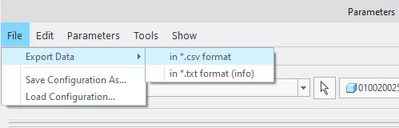
Can anyone tell me how I can Export the parameter table in .xml format? I only have the option for .csv and .txt. I know you can export to .xml because I have done it before, but now the option is not available.


phammerstrom_0-1585099383787.png


Best answer by Lars_F

Hi,


I believe there was a support article out of this.

Perhaps this applies to your case also?


Article - CS303553
File > Import Data/Export Data missing from Parameters window in Creo Parametric

-----------------------clip clip

Applies To:

Creo Parametric 4.0 to 8.0


Description:

  • How to get option to export/import parameters as XML file from Parameters dialog box
  • Import/Export parameters as XML option missing from Parameters window
  • How to import parameters as XML
  • Absence of import/export parameters as XML
  • In Parameters tab for 3D model, Import Data feature disappeared
  • Importing parameter as xml file greyed out


Cause:

  • ASSEMBLY license feature missing from session


Resolution:

  • Reconfigure or add Assembly license feature to session
    • Reconfigure Creo Parametric to use base license which has ASSEMBLY option module
      • CS60577 How to reconfigure Creo Parametric
  • To include ASSEMBLY module into session
    • File > Options
    • Licensing > Refresh License List
      • From Floating modules area, select ASSEMBLY module > OK
        • NOTE: Reconfiguration is complete for current Creo Parametric session
        • ASSEMBLY module will not exist when session is closed
  • If using Windchill, when modifying data in check-in, Import Data menu does not display in Parameters command
  • Starting from Creo Parametric 8.0.5.0, Assembly license feature is not required to import parameters via XML any more.


Br,

Lars

3 replies

24-Ruby III
March 25, 2020

Hi,

in Part and Assembly mode (Creo 5.0.5.0) I can see following dialog.

xml.png


15-Moonstone
March 25, 2020

Export of parameters in XML was introduced in Creo 4 or 5. What version are you on?

1-Visitor
March 25, 2020

Sorry, I should have listed this... I am using Creo 6.0.3.0. I was wondering if there is a config option that changed or something? I know I used to have this option.

24-Ruby III
March 25, 2020

@phammerstrom wrote:

Sorry, I should have listed this... I am using Creo 6.0.3.0. I was wondering if there is a config option that changed or something? I know I used to have this option.


Hi,

rename your config.pro file to ensure that the problem is related to configuration option.

4-Participant
May 28, 2023

Hello, 


I was just dealing with the same issue. The solution is kinda easy. Just use the command below "Export Data" -> "Save Configuration As". By default it saves an xml file.


EDIT:Aww, dayum, it doesnt save the params and values. **bleep**.


CREO 7.0.2.0 has the same options as you have.

Lars_F14-AlexandriteAnswer
14-Alexandrite
May 31, 2023

Hi,


I believe there was a support article out of this.

Perhaps this applies to your case also?


Article - CS303553
File > Import Data/Export Data missing from Parameters window in Creo Parametric

-----------------------clip clip

Applies To:

Creo Parametric 4.0 to 8.0


Description:

  • How to get option to export/import parameters as XML file from Parameters dialog box
  • Import/Export parameters as XML option missing from Parameters window
  • How to import parameters as XML
  • Absence of import/export parameters as XML
  • In Parameters tab for 3D model, Import Data feature disappeared
  • Importing parameter as xml file greyed out


Cause:

  • ASSEMBLY license feature missing from session


Resolution:

  • Reconfigure or add Assembly license feature to session
    • Reconfigure Creo Parametric to use base license which has ASSEMBLY option module
      • CS60577 How to reconfigure Creo Parametric
  • To include ASSEMBLY module into session
    • File > Options
    • Licensing > Refresh License List
      • From Floating modules area, select ASSEMBLY module > OK
        • NOTE: Reconfiguration is complete for current Creo Parametric session
        • ASSEMBLY module will not exist when session is closed
  • If using Windchill, when modifying data in check-in, Import Data menu does not display in Parameters command
  • Starting from Creo Parametric 8.0.5.0, Assembly license feature is not required to import parameters via XML any more.


Br,

Lars

19-Tanzanite
May 31, 2023

Thanks!  I was wondering why it is only sometimes that I am able to export / import parameters using XML.

(in our company, sometimes a license pack without the ASSEMBLY module is assigned to me...)