
12-Amethyst
July 16, 2019
Solved

export to STEP mapkey

Since Creo 5, I cant automate the export funtion anymore with a mapkey because I always want to export only solid models without surfaces. But in Creo 5, when exporting to STEP, you cant automatically have surfaces de-selected (it only works in one session). Does anyone have a proper mapkey compatible with Creo5 that tackles this?
mcestnikAnswer
14-Alexandrite
July 16, 2019

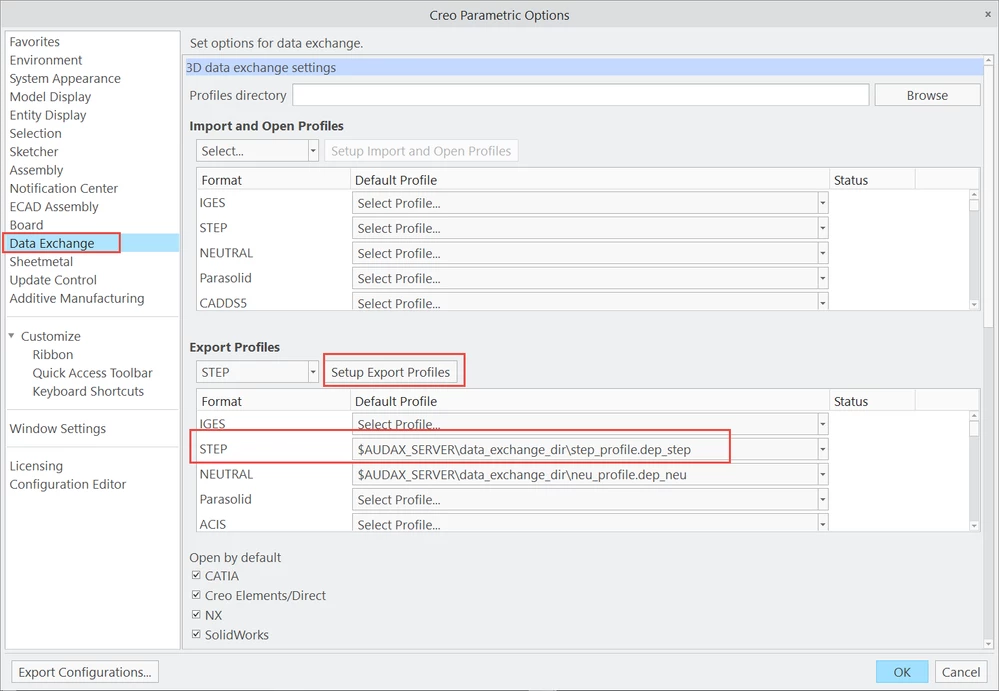
Set your custom export settings for Step in Data Exchange window. This options are later set for every export.

2019-07-16_12-40-29.png

3 replies

mcestnik14-AlexandriteAnswer
14-Alexandrite
July 16, 2019

Set your custom export settings for Step in Data Exchange window. This options are later set for every export.

2019-07-16_12-40-29.png

Translate
KenFarley
21-Topaz II
July 16, 2019

I've found that the only way I can have my settings default to those I save in the profile is to set, in my config.pro, one of the (apparently new in Creo 4?) options that specifies the file name, such as

export_profiles_step <full path and file name of option file>

Otherwise, it seems the settings I make are only for the current session. Unless there is some other config option I need to make to allow my settings to be persistent?

Translate
1-Visitor
May 28, 2021

Hey,

I think you should try the BIMDeX plugins for exporting the Creo. I found it very efficient.

Translate