10-Marble
February 21, 2023
Solved

Exporting DRW tp DWG with correct layers

  • February 21, 2023
  • 1 reply
  • 1785 views

I have to export DRW file to AutoCAD DWG format with certain layers as per customer specs. For example, all solid (continuous) lines have to be on Main layer, all axes an on Axis layer, hatches on its own layer etc.

I have been trying to figure out the easiest way to do this by exploring two avenues: intf_out_layer and intf2d_out_dxf_mapping_file values.

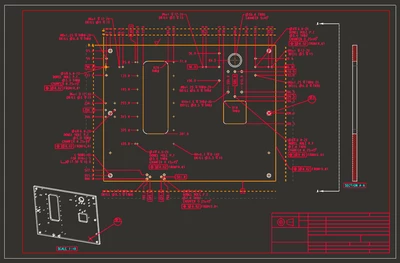
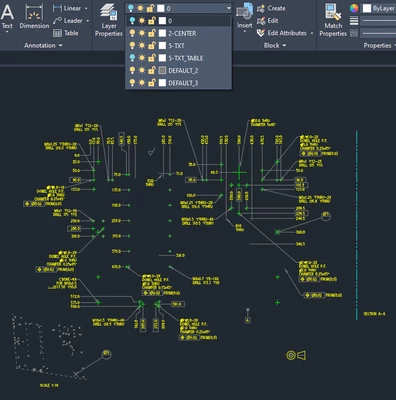
First case: intf_out_layer is NONE and intf2d_out_dxf_mapping_file values is not assigned (or it is using default Creo values). In TXT layer I placed all dims, notes and everything else that has text. Note how view lines were not selected. I am not sure what filter I should use for it. I also made TXT-TABLE layer to filter out tables.
dveljkovic_0-1676986032540.png

After purging DWG file I got this:

dveljkovic_1-1676986274836.png

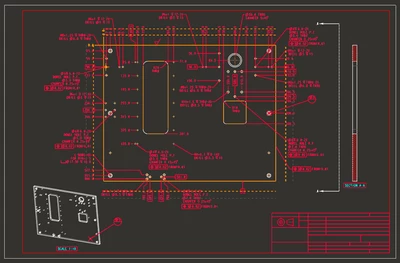
All solid lines are under 0 layer, hidden lines are under Default2 and view line is under Default3. I will get to case intf_out_layer part_layer later because it also has issues I cannot resolve.

Is there a way to filter continuous lines on one layer, same for hidden and also format lines in Creo? What filer should I use for view direction line?


Best answer by MartinHanak

@dveljkovic wrote:

I have to export DRW file to AutoCAD DWG format with certain layers as per customer specs. For example, all solid (continuous) lines have to be on Main layer, all axes an on Axis layer, hatches on its own layer etc.

I have been trying to figure out the easiest way to do this by exploring two avenues: intf_out_layer and intf2d_out_dxf_mapping_file values.

First case: intf_out_layer is NONE and intf2d_out_dxf_mapping_file values is not assigned (or it is using default Creo values). In TXT layer I placed all dims, notes and everything else that has text. Note how view lines were not selected. I am not sure what filter I should use for it. I also made TXT-TABLE layer to filter out tables.

dveljkovic_0-1676986032540.png

After purging DWG file I got this:

dveljkovic_1-1676986274836.png

All solid lines are under 0 layer, hidden lines are under Default2 and view line is under Default3. I will get to case intf_out_layer part_layer later because it also has issues I cannot resolve.

Is there a way to filter continuous lines on one layer, same for hidden and also format lines in Creo? What filer should I use for view direction line?


Hi,

Creo does not have such functionality.

1 reply

24-Ruby III
February 22, 2023

@dveljkovic wrote:

I have to export DRW file to AutoCAD DWG format with certain layers as per customer specs. For example, all solid (continuous) lines have to be on Main layer, all axes an on Axis layer, hatches on its own layer etc.

I have been trying to figure out the easiest way to do this by exploring two avenues: intf_out_layer and intf2d_out_dxf_mapping_file values.

First case: intf_out_layer is NONE and intf2d_out_dxf_mapping_file values is not assigned (or it is using default Creo values). In TXT layer I placed all dims, notes and everything else that has text. Note how view lines were not selected. I am not sure what filter I should use for it. I also made TXT-TABLE layer to filter out tables.

dveljkovic_0-1676986032540.png

After purging DWG file I got this:

dveljkovic_1-1676986274836.png

All solid lines are under 0 layer, hidden lines are under Default2 and view line is under Default3. I will get to case intf_out_layer part_layer later because it also has issues I cannot resolve.

Is there a way to filter continuous lines on one layer, same for hidden and also format lines in Creo? What filer should I use for view direction line?


Hi,

Creo does not have such functionality.

10-Marble
February 22, 2023

Nor even in Creo 1209 version? Just kidding ... Sometimes I wonder if these Cre(p)o guys really know what they are doing ...