
10-Marble
February 18, 2025
Solved

Expressions in family table

  • February 18, 2025
  • 1 reply
  • 911 views

I'm working in Creo 11 and I have a fairly simple part, but I was trying to demonstrate a few concepts.  


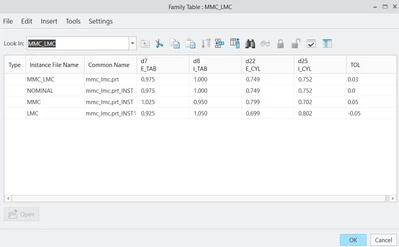
I'd like to have a family table of a part.  This part has 4 dimensions that will vary between nominal, MMC and LMC with the tolerance being a parameter.  


I was hoping to write an expression that the MMC part was nominal + &tol and the LMC part was nominal - &tol, and I'd like to change the tolerance as a parameter.  
I've used the excel table in the family table - but I wanted to verify that I'm not missing a better option. 
 

kleipold_0-1739897876775.png


Best answer by KenFarley

If I were attempting this, I'd probably have each of the four "nominal" dimensions as a parameter, as well as the tolerance. Something like:

nomDim1
nomDim2
nomDim3
nomDim4
tolerance

I'd drive the design with relations that utilize these parameters to set the actual dimensions of the part. You could also set up the nominal dimensions in the relations, so everything is in one place, like this:

/*
/* Set nominal dimensions. (Replace XX.XXX etc. with actual numbers)
/*
nomDim1 = XX.XXX
nomDim2 = YY.YYY
nomDim3 = ZZ.ZZZ
nomDim4 = AA.AAA

/*
/* Use current tolerance and nominal dimensions to set actual part dimensions.
/*
dim1 = nomDim1 + tolerance
dim2 = nomDim2 + tolerance
dim3 = nomDim3 + tolerance
dim4 = nomDim4 + tolerance

Thus, your family table would only have the instance name, and the tolerance for each instance. When you open a particular instance, the dimensions will be calculated, and all will be as you wish. This simplifies the family table considerably, and changing things is pretty easy.

1 reply

KenFarley
KenFarley21-Topaz IIAnswer
21-Topaz II
February 18, 2025

If I were attempting this, I'd probably have each of the four "nominal" dimensions as a parameter, as well as the tolerance. Something like:

nomDim1
nomDim2
nomDim3
nomDim4
tolerance

I'd drive the design with relations that utilize these parameters to set the actual dimensions of the part. You could also set up the nominal dimensions in the relations, so everything is in one place, like this:

/*
/* Set nominal dimensions. (Replace XX.XXX etc. with actual numbers)
/*
nomDim1 = XX.XXX
nomDim2 = YY.YYY
nomDim3 = ZZ.ZZZ
nomDim4 = AA.AAA

/*
/* Use current tolerance and nominal dimensions to set actual part dimensions.
/*
dim1 = nomDim1 + tolerance
dim2 = nomDim2 + tolerance
dim3 = nomDim3 + tolerance
dim4 = nomDim4 + tolerance

Thus, your family table would only have the instance name, and the tolerance for each instance. When you open a particular instance, the dimensions will be calculated, and all will be as you wish. This simplifies the family table considerably, and changing things is pretty easy.

kleipold10-MarbleAuthor
10-Marble
February 18, 2025
You're absolutely right. I way over thought this.
Thanks!

Community Moderator
March 11, 2025

Hi @kleipold,


I wanted to see if you got the help you needed.

If so, please mark the appropriate reply as the Accepted Solution. It will help other members who may have the same question.
Of course, if you have more to share on your issue, please pursue the conversation. 


Thanks,
Anurag
