
12-Amethyst
September 14, 2022
Solved

External Copy Geometry features dependencies ('where used')

  • September 14, 2022
  • 2 replies
  • 2636 views

Hello everyone, 

I can't find if there is a direct way to find out which of the elements in an External Copy Geometry feature have dependencies (children) in the part this feature is in?

Example: A part has an External Copy Geometry feature that references a Publish Geometry in a skeleton part. It contains a number of datums. Only some of those datums are actually referenced by the features further down in the part's model tree. I want to simplify the Publish Geometry / External Copy Geometry by removing the datums that are not referenced in the part. Is there an easy way to find out which datums are not used? With the reference viewer I can see which features are dependent on the External Copy Geometry feature, but not which elements from the External Copy Geometry they reference? 

I hope it's clear what I mean...  The reason for asking is that I want to cleanup the external references and  skeleton part and remove those elements that are no longer used.
Currently I would have to check the references for each feature that is dependent on the External Copy Geometry one by one and write then down. After that I would compare this list to the elements in the External Copy Geometry to find which ones are not used. That seems like a ridiculous amount of work. There must be an easy way?

Thanks in advance for any help!
Best answer by pausob

Here's my idea that might help you:

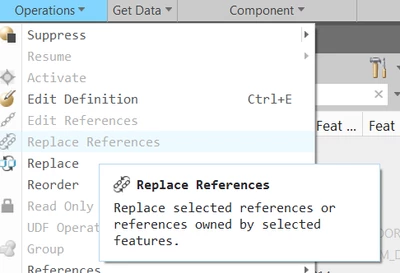
Select your extern copy geom (ECG) feature, and then do Operations -> Replace References

pausob_0-1663283586764.png

You will get a list of all the entities and features inside the ECG that are being used as references by the downstream features in the model...

2 replies

tbraxton
22-Sapphire II
22-Sapphire II
September 14, 2022

You should be able to build a search query that will find the set of references that are a parent or child of one or more features. This is the only option I can think of that would be faster than manually performing the query. By nesting the queries using Boolean logic you should be able to get a list of what you need.


http://support.ptc.com/help/creo/creo_pma/usascii/index.html#page/fundamentals%2Ffundamentals%2Ffund_six_sub%2FTo_Build_a_Nested_Query_in_the_Search_Tool.html 

12-Amethyst
September 15, 2022

Thank you for your help. I tried the search function before, but could not find the the right search settings to get what I need. 
I imagine a procedure where I select one element within the External Copy Geometry (e.g. a datum plane) and then need the search settings that search for the features that are child of the selected element. I haven't found a way to search based on the selected element, only searches that use the entire External Copy Geometry feature as a base for the search. I hope this makes sense and you or someone else can help me out.

pausob19-TanzaniteAnswer
19-Tanzanite
September 15, 2022

Here's my idea that might help you:

Select your extern copy geom (ECG) feature, and then do Operations -> Replace References

pausob_0-1663283586764.png

You will get a list of all the entities and features inside the ECG that are being used as references by the downstream features in the model...

tbraxton
22-Sapphire II
22-Sapphire II
September 15, 2022

@pausob Your approach is useful. It is worth noting that the same list is available in the Global Reference Viewer. The same data is presented in the GRV when you expand the double arrows in the ECG icon in the GRV window. An example is shown here. It will only list references that have children.


tbraxton_0-1663284265166.png