
1-Visitor
January 29, 2021
Solved

Extrude in assembly not displaying

  • January 29, 2021
  • 1 reply
  • 7983 views

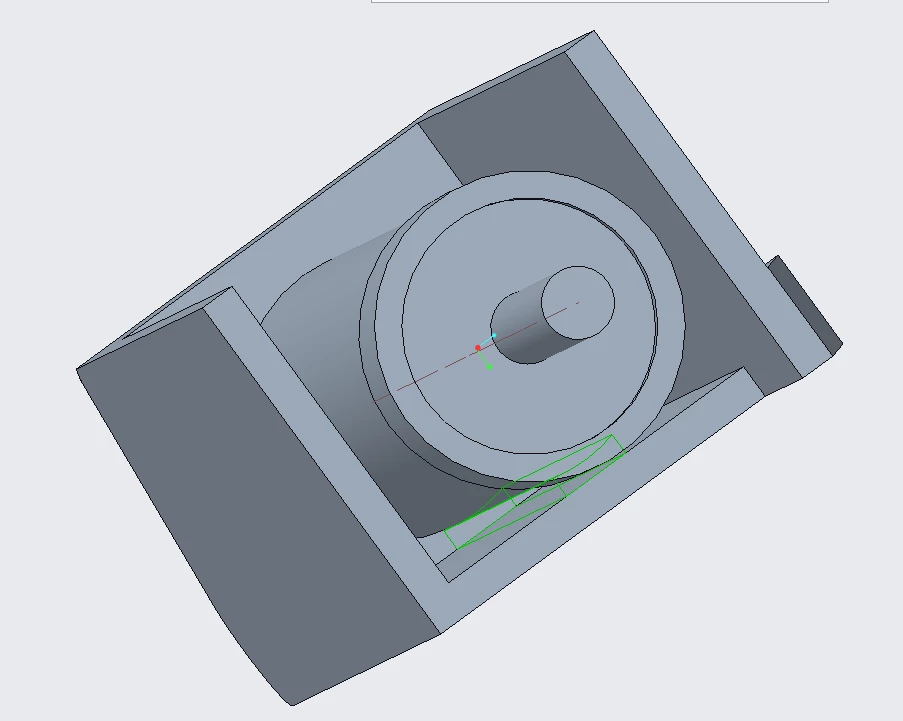
Hi, I'm new to the ptc creo and I'm trying to use the extrude option while in an assebly and the idea is to extrude from one part till the surface of the next as shown below with the green lines. The extrude is from the casing let's say, to the cylinder, however, it doesn't seem to be visible. I've added the extrude to the part, but it's still not visible.

Can you please help? extrude.PNG
Best answer by tbraxton

This is not an appropriate use of the extrude feature to add material in the context of an assembly. In general you should avoid creating assembly features that alter the geometry of parts. There are many tools (top down design) provided to accomplish this. You can not add solid geometry to a part with an assembly feature.


If you are running Creo 7 use a multi body design paradigm in part mode and then derive your assembly for the two parts.


If you are not in Creo 7 then use an external copy geometry from one master part to define the geometry of the derivative part that needs the matched mating geometry.


1 reply

tbraxton
22-Sapphire II
tbraxton22-Sapphire IIAnswer
22-Sapphire II
January 29, 2021

This is not an appropriate use of the extrude feature to add material in the context of an assembly. In general you should avoid creating assembly features that alter the geometry of parts. There are many tools (top down design) provided to accomplish this. You can not add solid geometry to a part with an assembly feature.


If you are running Creo 7 use a multi body design paradigm in part mode and then derive your assembly for the two parts.


If you are not in Creo 7 then use an external copy geometry from one master part to define the geometry of the derivative part that needs the matched mating geometry.
