Dale_Rosema
23-Emerald III
October 26, 2023
Question

Family Table Cell Oddities

  • October 26, 2023
  • 2 replies
  • 2836 views

The disappearing cursor is being worked on, but now I have had another oddity come up in family table cells.

The IT department has recommended that I check with PTC on this for possible RAM allocation error.

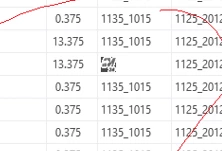
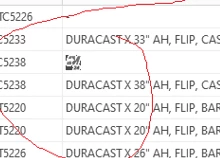
The issues is that I had a MasterCAM logo show up in (2) of my family table cells. It is not very repeatable.


I took a screen dump so here are two snippets of the family table:
Dale_Rosema_0-1698335326475.png


Dale_Rosema_1-1698335341745.png


Thanks,

Dale


2 replies

23-Emerald III
October 26, 2023

Have you rebooted your workstation recently?

I find some of those 'can't explain weirdness' to be caused by memory allocation issues where Creo does not release all memory when it closes. A reboot is the only way to free up that memory.

Dale_Rosema
23-Emerald III
October 27, 2023

Shut it down every Friday. Boot it anew every Monday.


How often does everyone else reboot there systems?

kdirth
21-Topaz I
October 27, 2023

I restart every night and shut it down on Fridays.


Also, be aware that with many newer systems, shutdown does not create a restart when you start up the computer the next day.  Shutdown is more like a deep sleep for the computer to enable a quicker start up and does not clear the memory.

There is always more to learn.
Patriot_1776
22-Sapphire II
November 1, 2023

You took a "screen dump" of the "big dump" Creo took in your family table.  Got it!🤣


That is bizarre though, never had anything like that happen, never thought something like that COULD happen.  Sounds like maybe a graphics card issue?  I had these weird "sparklies" all over my screen recently, not just in Creo but across everything including my background.  Manually turned the power off, waited a few minutes, fired it back up, and problem solved.


Best of luck!