
16-Pearl
December 12, 2025
Solved

Family Table models vs Model Check

  • December 12, 2025
  • 3 replies
  • 330 views

Hi there,


I have a frustrating problem with Model Check.

We use screws in our assemblies. Those screw's length is defined by a family table. 

Unfortunately, ModelCheck always checks those screws in the assembly and causes a "is modified". 

Even if I check the assembly with the option "top level".
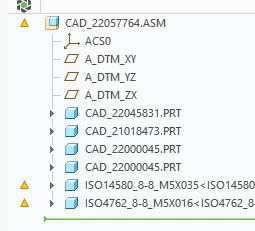
 

Mat_0-1765536329897.png


I already added "IF ( MODELNAME EQ ISO* ) NOCHECK" to condition.mcc 
But no luck. Creo keeps modifying those models nevertheless.


If I open the screw itself and run model check, I get a "nocheck", which I expect. 

 

Mat_1-1765537040010.png

BUT Creo list the model as "modified" anyway.
 

Best answer by Mat

a little Update:

That "behaviour" also shows up with other random instances of other family table driven models (e.g. flatten sheetmetal).

BTW, I forgot to mention, that I am running Creo 10.


I tried several things:

  • emptying configurations (removing tests from modelcheck)
    I ended up with a completely empty check.mch and start.mcs file.
    That config_init.mc only contained "MC_ENABLE YNA Y" to be able to run modelcheck at all. ModelCheck still modifies those instances.
  • I installed Creo 12 and tested Modelcheck again. 
    MC also modifies those instances.
  • I also started Creo without any custom config.pro options ( besides modelcheck_dir to point to my testing mc-files).
    Still no luck.
  • In an act of desperation, I "downgraded" to Creo 9.
    And there You go. ModelCheck runs as intended!
    Mat_0-1768484992611.png

At this time, since all of my configuration file changing attempts were unsuccessful but only switching to Creo 9 worked, I consider this as a bug in Creo Parametric. If it is a bug (please comment, If You can see the same behaviour with Your Creo installation in a Windchill environment), Creo 10 and above are affected.


3 replies

24-Ruby III
December 12, 2025

Hi,

just a basic question: Are all FT instances successfully verified and then the generic model saved?

Mat16-PearlAuthor
16-Pearl
December 12, 2025

Yes, they look all verified:

Mat_0-1765544163272.png


10-Marble
December 17, 2025

Does your Model Check change the assembly layer settings in any way?

If so, this can propagate down to the parts in the assembly causing them to be modified.

Mat16-PearlAuthor
16-Pearl
December 17, 2025

the layers of the assembly or the parts are not changed. 


even more strange, if I change the condition.mcc file and add "IF ( MODELNAME EQ asm0001.asm ) NOCHECK", MC still runs its checks on the model.

I can only convince MC to ignore that model (or run other checks for testing), if I set the condition to "MODELNAME EQ asm0001*"


10-Marble
December 17, 2025

There is a difference between MODELNAME (PTC_COMMON_NAME) and FILENAME.

Are you using Windchill?

Mat16-PearlAuthorAnswer
16-Pearl
January 15, 2026

a little Update:

That "behaviour" also shows up with other random instances of other family table driven models (e.g. flatten sheetmetal).

BTW, I forgot to mention, that I am running Creo 10.


I tried several things:

  • emptying configurations (removing tests from modelcheck)
    I ended up with a completely empty check.mch and start.mcs file.
    That config_init.mc only contained "MC_ENABLE YNA Y" to be able to run modelcheck at all. ModelCheck still modifies those instances.
  • I installed Creo 12 and tested Modelcheck again. 
    MC also modifies those instances.
  • I also started Creo without any custom config.pro options ( besides modelcheck_dir to point to my testing mc-files).
    Still no luck.
  • In an act of desperation, I "downgraded" to Creo 9.
    And there You go. ModelCheck runs as intended!
    Mat_0-1768484992611.png

At this time, since all of my configuration file changing attempts were unsuccessful but only switching to Creo 9 worked, I consider this as a bug in Creo Parametric. If it is a bug (please comment, If You can see the same behaviour with Your Creo installation in a Windchill environment), Creo 10 and above are affected.


Mat16-PearlAuthor
16-Pearl
January 16, 2026

BTW, my "solution" for my problem is, to disable ModelCheck Gatekeeper on Windchill for now.

Thanks PTC for breaking ModelCheck.

14-Alexandrite
February 26, 2026

That is Sad. Try adding the following line in the Condition (.mcc file) file


IF (FT_INSTANCE_PRT) NOCHECK


Expected behaviour: If the Model is a Family Instance Modelcheck should Skip the check.


Please let us know if this works.