13-Aquamarine
July 14, 2023
Solved

Family Table problem wrong dimension is shown

  • July 14, 2023
  • 4 replies
  • 8989 views

I have a generic model with hole feature and has some instances. In one of the instance the feature is set to NO while others have set to Yes. The distance from edge to the centre of hole is added as feature in generic and is part of the family table. Now for the instance where the hole is not there the dimension is displayed from the generic model.. If the dimension for the particular instance is not available then it should be set to dash or left blank . How to solve the issue?
 

Best answer by MartinHanak

@KSHITISH_S wrote:

I have attached the drawing and part


Hi,

I modified prt+drw in Creo 7.0.5.0.


prt

1.] I added parameters DD, HOLE_EXISTS

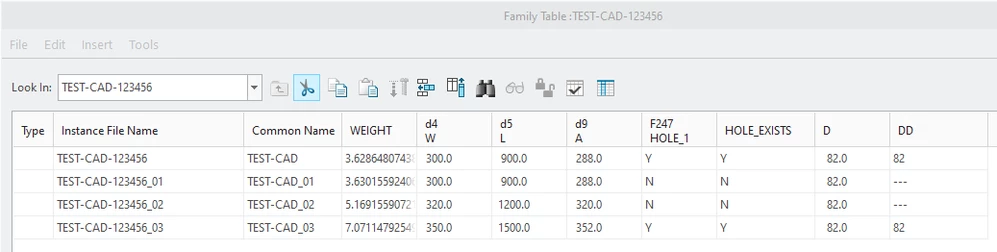
2.] I modified FT

MartinHanak_0-1689851035388.png

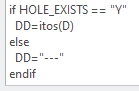
3.] I modified relations

MartinHanak_1-1689851103230.png

4.] I verified FT and saved the model


drw

1.] I modified repeat region filters

MartinHanak_2-1689851237399.png

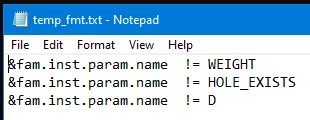
2.] resulting drawing table

MartinHanak_3-1689851301385.png


I uploaded modified files.


4 replies

24-Ruby III
July 14, 2023

Hi,

please publish some pictures showing the problem. Also pack your model into zip file and upload this zip file.

13-Aquamarine
July 14, 2023

Hello @MartinHanak , I have added the screen shots

24-Ruby III
July 14, 2023

Hi,

please upload your model.


Note related to Family Table-image1.JPG

DISTANCE:FID_315 is measurement. The value is driven by geometry. Remove this column from family table. Family table usually contain variable items, only.

MartinHanak_0-1689319792897.png


KenFarley
21-Topaz II
July 14, 2023

I don't think you can set a dimensional value to be a non-numeric.

If I were going to do something like this, I'd probably take this approach:

(1) Define a parameter as a YES/NO (boolean) such as featActive

(2) Add featActive to the family table.

(3) Set featActive to the same setting as your feature activation.

(4) Define a parameter to represent the dimension value, such as dimValue.

(5) Use a relation to set the dimValue, based on the setting of featActive.


For example:

IF featActive
 dimValue = [Dimension rendered as text]
ELSE
 dimValue = "-"
ENDIF

Hopefully that is helpful. Converting a real number to text is something you can look for on here, it has been discussed many times.

If this isn't exactly what you're looking for, maybe explain in more detail what you are trying to do with this dimension. I am assuming, perhaps wrongly, that you want to put the value into a table on a drawing, or some such thing?

13-Aquamarine
July 20, 2023

I want the drawing to have the L, W, A and D dimensions populated in the family table. The dimension D is for feature Hole_1 which is not in instance1 and instance 2. But in the Drawing for instance 1 and instance 2 also the dimension D is populated as 82. Person reading the drawing assumes some error in table in the drawing.  

23-Emerald III
July 14, 2023

Which version/release of Creo are you using as that can make a difference.

13-Aquamarine
July 20, 2023

I use Creo 7

14-Alexandrite
July 14, 2023

Hello


You can just leave the dimension as *, so it would take the dimension from the generic as shown.

pushkarkhanna_0-1689354866395.png


Regards

Pushkar Khanna