
1-Visitor
December 9, 2016
Question

Feature control frame in revision column.

  • December 9, 2016
  • 1 reply
  • 2227 views

i have created feature control frame as a free note & mention in revision column. but when I suppose to add a new row the location gets disturb. How can I make same as parametric so that when I will add or delete any row its should be in that particular row.

Please refer condition 1 & condition 2
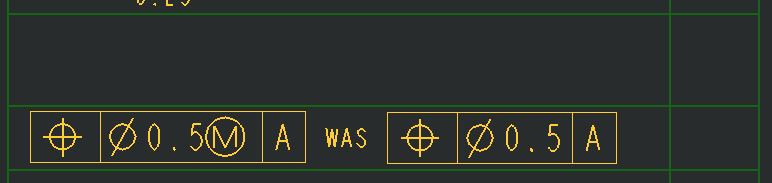
condition-1.JPG

Condition-2: After adding extra row, original location shifts

 

condition-2.JPG


This thread is inactive and closed by the PTC Community Management Team. If you would like to provide a reply and re-open this thread, please notify the moderator and reference the thread. You may also use "Start a topic" button to ask a new question. Please be sure to include what version of the PTC product you are using so another community member knowledgeable about your version may be able to assist.

1 reply

1-Visitor
December 9, 2016

If you are creating the FCF with dumb text, you can just create it inside of the table cell. The other option would be to create it as a GTOL, place it as a free note, call it in the table using &g## syntax where ## is the GTOL ID, then delete the free note GTOL.

achopade1-VisitorAuthor
1-Visitor
December 12, 2016

Hello Roger,

Thanks for reply, I have tried the second option (call it in the table using &g## syntax where ## is the GTOL ID, then delete the free note GTOL.) but its not working.

will you please elaborate same?

1-Visitor
December 12, 2016

Ashwin,

Where are you getting stuck? Once you have the GTOL as a free note, hovering over it will give you the ID, then use that same ID in the table cell:

gtol1.jpg

Table cell will look like this:

gtol2.jpg

You can then delete or erase the GTOL that is floating in empty space - the one in the table cell will stay there.

Thanks,

Roger