14-Alexandrite
July 3, 2025
Solved

FILE SIZE

  • July 3, 2025
  • 3 replies
  • 643 views

Hello, is there a method to know the file size in Mb of an assembly or part in creo or in windchill?


Tank you,


Michele Barile

Best answer by Van_AG

Open a model in Creo

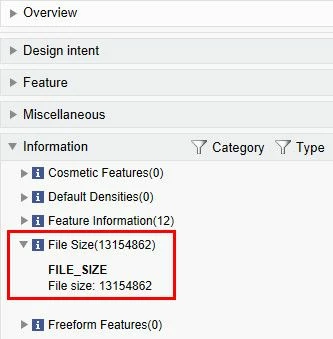
Run ModelCHECK in interactive mode (File > Prepare > ModelCHECK Interactive)

Expand Information section in ModelCHECK report

There is FILE_SIZE parameter with the file size.

But in bytes, not Mb

Snap-2025-07-03-015.jpg


If the model exist only in-session i.e. the model not saved yet

the FILE_SIZE will be with 'error' value


In Windchill

open a model page

open the 'Content' tab

see File Size in kb in the 'Primary Content' section

3 replies

21-Topaz II
July 3, 2025

The only way I know of to tell the file size of a part/assembly is to write it to disk and see. I don't see any means of obtaining this information from a part that is currently in session. Maybe this kind of info isn't offered because it's somewhat unknown until the file is written. Creo files are compressed when written to disk, I believe.

Van_AG15-MoonstoneAnswer
15-Moonstone
July 3, 2025

Open a model in Creo

Run ModelCHECK in interactive mode (File > Prepare > ModelCHECK Interactive)

Expand Information section in ModelCHECK report

There is FILE_SIZE parameter with the file size.

But in bytes, not Mb

Snap-2025-07-03-015.jpg


If the model exist only in-session i.e. the model not saved yet

the FILE_SIZE will be with 'error' value


In Windchill

open a model page

open the 'Content' tab

see File Size in kb in the 'Primary Content' section

23-Emerald III
July 3, 2025

Within Windchill PDMLink, If you view the details of a part, you can look at the "content" tab or the "history" tab, it will tell you the file size.


StephenW_0-1751557414154.png


StephenW_1-1751557463871.png