
16-Pearl
May 26, 2025
Solved

Filter mapkeys

  • May 26, 2025
  • 1 reply
  • 1162 views

Hello, I've been using filters for a long time but never was satisfied with cliking to select window and choosing specified one. So i desided to create mapkey for myself fo without desturbing workflow i could change filter by using mapkeys. 
Here comes the problem:
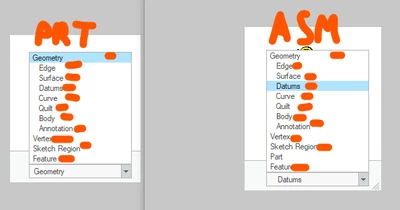
ilyachaban_0-1748238950282.png

In PTC Creo PRT and ASM filters are different in this list. 
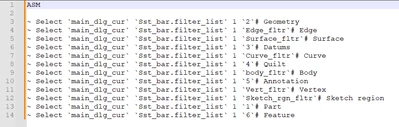
Not much of a problem if mapkey knew about choosing element in this list by it's name but look at what it does when choosing it.
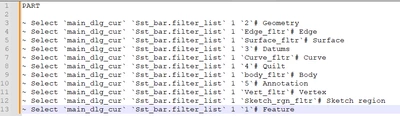
ilyachaban_1-1748239028376.png

ilyachaban_2-1748239037183.png

in some cases there is ID in list in other name of element
I would like to syncronize mapkeys for both PRT and ASM so they are the same but feature in PRT is "1" in ASM is "6"

is there any other place where can i change this filter but not in the bottom right corner so it chooses filter by it's name not by ID in list?

Best answer by tbraxton

You can test these mapkeys and see if they help resolve the issue of working in both part and assembly mode. They are not generated by recording the mapkey but exploit some unique numeric codes to set the selection filters. I am not able to answer any question related to how these codes are used or generated within Creo and be aware that PTC would probably consider these mapkeys as unsupported.


!**** Selection Filter Control

mapkey qa @MAPKEY_LABELselection filter set annotation;\
mapkey(continued) ~ Command `ProCmdSelFilterSet` 283;

mapkey qc @MAPKEY_NAMEselection filter set curve;\
mapkey(continued) @MAPKEY_LABELselection filter set curve;\
mapkey(continued) ~ Command `ProCmdSelFilterSet` 13;

mapkey qd @MAPKEY_NAMEselection filter set datum;\
mapkey(continued) @MAPKEY_LABELselection filter set datum;\
mapkey(continued) ~ Command `ProCmdSelFilterSet` 320003;

mapkey qe @MAPKEY_NAMEselection filter set edge;\
mapkey(continued) @MAPKEY_LABELselection filter set edge;\
mapkey(continued) ~ Command `ProCmdSelFilterSet` 9;

mapkey qf @MAPKEY_NAMEselection filter set feature;\
mapkey(continued) @MAPKEY_LABELselection filter set feature;\
mapkey(continued) ~ Command `ProCmdSelFilterSet` 0;

mapkey qg @MAPKEY_NAMEselection filter set geometry;\
mapkey(continued) @MAPKEY_LABELselection filter set geometry;\
mapkey(continued) ~ Command `ProCmdSelFilterSet` 320002;

mapkey qp @MAPKEY_NAMEselection filter set part;\
mapkey(continued) @MAPKEY_LABELselection filter set part;\
mapkey(continued) ~ Command `ProCmdSelFilterSet` 4;

mapkey qq @MAPKEY_NAMEselection filter set quilts;\
mapkey(continued) @MAPKEY_LABELselection filter set quilts;\
mapkey(continued) ~ Command `ProCmdSelFilterSet` 11;

mapkey qs @MAPKEY_LABELselection filter set surface;\
mapkey(continued) ~ Command `ProCmdSelFilterSet` 5;

mapkey qv @MAPKEY_NAMEselection filter set vertex;\
mapkey(continued) @MAPKEY_LABELselection filter set vertex;\
mapkey(continued) ~ Command `ProCmdSelFilterSet` 8;


1 reply

24-Ruby III
May 26, 2025

Hi,

if Feature filter is the only one "problem" then you can define My Filter (containing Feature option) in Assembly and Part mode.

When you select My Filter, Creo will add following line into trail file in both modes.

~ Select `main_dlg_cur` `Sst_bar.filter_list` 1 `udf_`