
11-Garnet
October 6, 2022
Question

GD & T advisor question
  • October 6, 2022
  • 2 replies
  • 1539 views

bchapman_0-1665075827966.png

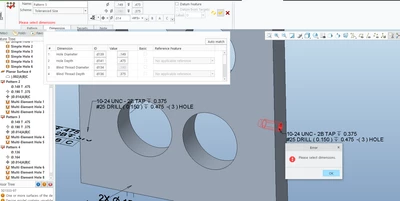
I created numerous tapped hole patterns and added GD & T call out with no problem. On this hole pattern I cannot add the GD & T call out,. It is asking for a dimension reference. I have tried picking the dimension, but will not work. e other patterns did not require me to pick a dimension? What am i doing wrong

2 replies

24-Ruby III
October 7, 2022

@bchapman wrote:

bchapman_0-1665075827966.png

I created numerous tapped hole patterns and added GD & T call out with no problem. On this hole pattern I cannot add the GD & T call out,. It is asking for a dimension reference. I have tried picking the dimension, but will not work. e other patterns did not require me to pick a dimension? What am i doing wrong


Hi,

not sure how many users own the module GD & T. Maybe it would be better to contact PTC Support.

Mfridman
16-Pearl
October 11, 2022

Hi @bchapman 

While it is hard to evaluate from the attached image, I do have one suggestions that works in some situations.

Please define the surface on which this hole is cut from as a GDT feature. make sure that you define that surface (maybe as a datum) BEFORE you are trying to add this new pattern. 

In many cases this resolves the issue because the reference surface is defined. If this doesn't help, please report a tech support ticket, so that we at PTC can take a deeper look and investigate with your model data