
17-Peridot
July 21, 2020
Question

Graphical Pro/PROGRAM Editor ... for FREE!

  • July 21, 2020
  • 3 replies
  • 6298 views

Just wanted to let you all know... the latest release of Nitro-PROGRAM has a NO HASSLE - FREE LICENSE option...


If you have ever struggled with seemingly never ending edit-import-fix-import-fix-import cycle of creating or editing Pro/PROGRAMs for Creo Parametric Parts or Assemblies... -OR- nearly screamed while trying to edit a Pro/PROGRAM that someone else created....


Then Nitro-PROGRAM is something you should download immediately and use!


Nitro-PROGRAM eliminates the pains and frustrations of the "text editor" and transforms the creating, editing and testing of Pro/PROGRAMs into a visual, drag-and-drop, editing love-fest by comparison.  😉
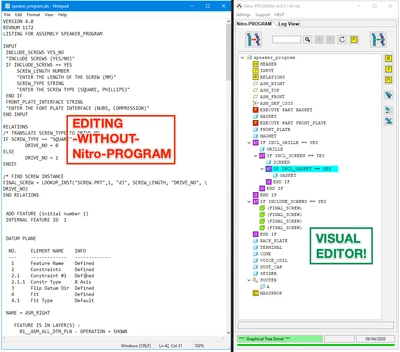
 

2020-07-21 at 9.52 AM.png


Nitro-PROGRAM saves time, reduces frustration, improves accuracy and enables you to think about the most important elements of Creo Parametric Automation -- data-flow and regeneration!


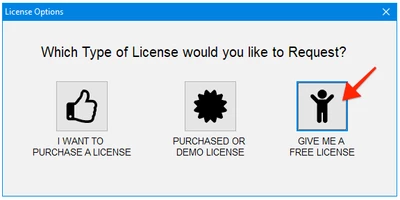
Simply Download, Unzip, Run.... and request a FREE License... NO REGISTRATION REQUIRED!
 

2020-07-21 at 10.02 AM.png

Nitro-PROGRAM does require JLINK to be installed with Creo Parametric.  (instructions here if you need them)

The only difference between FREE and a Purchased License is the amount of content you can import changes for.


Most companies, the FREE License will be extremely useful.


Enjoy!


Dave

3 replies

HamsterNL
18-Opal
July 30, 2020

@DavidBigelow,


I would like to try Nitro-PROGRAM, but I get the "Waiting for Licensing..." message. I don't get the option to choose for the "Free License".


I am running the 6.1.0 version:


HamsterNL_0-1596096988099.png


Edit: I might have installed a previous version of Nitro-PROGRAM in the past...maybe something was left in my registry that makes Nitro-PROGRAM looking for a license?

17-Peridot
July 30, 2020

Usually that is a firewall related thing on your computer or company network.


Licenses are obtained over HTTP -- so that should not be the issue.


You might try running the application as Administrator to see if that makes a difference.  If you can't check the local firewall settings to enable the application to run, also these ports locally should be OPEN in the computer's local firewall:


  • 9051 - Nitro-BOM
  • 9052 - Nitro-PROGRAM
  • 9055 - Nitro-CELL


Hope that helps.


Dave

HamsterNL
18-Opal
July 31, 2020

Hi Dave,


I will have to wait till next week to test Nitro-PROGRAM, because our IT is absent today.


I do have a question:


"The only difference between FREE and a Purchased License is the amount of content you can import changes for."


Can you tell when we will hit that limit? Our main model(s) has 1400+ input parameters, and dozens and dozens of conditional statements.

HamsterNL
18-Opal
August 3, 2020

Hi David,


I am testing Nitro-PROGRAM, and I am running into this situation:


I have an assembly where initially a component is suppressed. So when I open the assembly, that component is not loaded into session.


Creo will give a warning in Pro/PROGRAM that it can't find that component.


IF CUBE == YES
   EXECUTE PART TEST
   HEIGHT = HEIGHT
   END EXECUTE
!*** WARNG: cannot find this model
END IF


But Nitro-PROGRAM will give a Validation Error, because the EXECUTE statement "Does not end with END EXECUTE"


HamsterNL_1-1596445179858.png

Well...it does end with END EXECUTE, but Nitro-PROGRAM also "includes" the warning message, thus throwing the Validation Error.


HamsterNL_0-1596444855556.png


Nitro-PROGRAM should (have an option to) ignore the warning message of Creo.

17-Peridot
August 7, 2020

Ok - Just for anyone that finds this post.... 


The issue has been resolved and is available for download at:


Dave

HamsterNL
18-Opal
August 3, 2020

Hi David,


I have another situation where Nitro-PROGRAM throws a Validation Error:


We use the EXECUTE statement with a variable name. That name is calculated in the Relations of the assembly.

HamsterNL_0-1596445623479.png

But when I try to import, Nitro-PROGRAM says that "Object (PART_NAME) was not found in program tree":

HamsterNL_1-1596445723979.png

PART_NAME is in the Relations section of the PRO/PROGRAM, but Nitro-PROGRAM cant find it somehow.


I have attached my test assembly so you can take a look 🙂

17-Peridot
August 3, 2020

The "!*** WARNG: cannot find this model" is actually in the Pro/PROGRAM....  a PTC Error.  (edit it conventionally - you should see it there if you open up the test-assy.asm as the only thing insession and edit the Pro/PROGRAM).


I will check on the impact of that PTC error in the parsing of the Pro/PROGRAM within Nitro-PROGRAM... and you are right the variable name in the EXECUTE is obviously not parsing as valid... To be honest... I never thought of that...  pretty clever! ðŸ˜Ž


Dave

HamsterNL
18-Opal
August 3, 2020

@DavidBigelow wrote:

The "!*** WARNG: cannot find this model" is actually in the Pro/PROGRAM....  a PTC Error.  (edit it conventionally - you should see it there if you open up the test-assy.asm as the only thing in session and edit the Pro/PROGRAM).


Yes, it's a Creo warning that you will get if you open the PRO/PROGRAM when a component is not in session. But Creo accepts that warning if you make changes to PRO/PROGRAM.


Nitro-PROGRAM on the other hand throws an error, and refuses to import any changes to PRO/PROGRAM.


@DavidBigelow wrote:

... and you are right the variable name in the EXECUTE is obviously not parsing as valid... To be honest... I never thought of that...  pretty clever! ðŸ˜Ž


We are using that technique on a few components, works like a charm ðŸ˜Ž