4-Participant
January 30, 2025
Solved

Grey images on drawings

  • January 30, 2025
  • 3 replies
  • 1200 views

I insert images as Paintbrush object or as image and whenever I erase memory a reopen the drawing, all images appears as grey rectangles. THey are not printed in PDF.


I've seen an article that encourage to change "Config Color Option" from NO to YES but I'm not being able to find it.


I'm using Creo 9.0.8.0


Thanks!

Best answer by StephenW

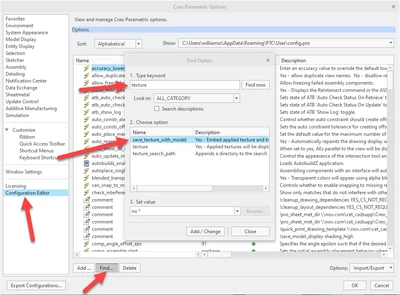
In the cofiguration editor, use FIND

Then type a keyword, I used texture, since I know there aren't that many options using texture. 

Select the one you want, set the value and then Add/Change. Make sure you save the config when prompted.


StephenW_0-1738584568168.png


3 replies

16-Pearl
January 30, 2025

You are in the wrong forum.


PTC has two CAD systems:    Creo+ and Creo Parametric    and     Creo Elements Direct.


Which makes it confusing.


More, for Creo Elements Direct:

- The 3D software name is Modeling, and

- The 2D software name is Drafting.


For Creo+ and Creo Parametric, use only this tab:

KotomEng_0-1738254649729.png


You should move your post to this community to have a better chance to get an answer.

To move your post, click on the three vertical dots on your initial post and click on "Notify Moderator".


23-Emerald III
January 31, 2025

I'm not sure if this is the same problem as https://support.ptc.com/appserver/cs/view/spr.jsp?n=14809409&_gl=1*1i5jb0o*_gcl_au*MjczMTE2NDA5LjE3MzU4MTU0NjAuNzY3NTczNjUuMTczODI3Mjc2My4xNzM4MjcyNzY5*_ga*MjAzNzY0MjE0My4xNzI2NDk3MzYx*_ga_7NMP2MSYPM*MTczODMyMTk0Ni4yMDQuMS4xNzM4MzIyMjM5LjguMC4w*_ga_CBN5QVB9VJ*MTczODMyMjE1OS4xMTAuMS4xNzM4MzIyMTg3LjAuMC4w

This shows to have been fixed in Creo 9.0.8.0 but you have to save at least once in that version.

It also shows some work-arounds (if it is the same issue)

StephenW_0-1738322493909.png


kdirth
21-Topaz I
21-Topaz I
January 31, 2025

I believe you need to set config save_texture_with_model to yes.


This will save all images in models and drawings in the file.

There is always more to learn.
4-Participant
February 3, 2025

I've search "save_texture_with_model" parameter in both "Config.pro" and "config.sup" with no success, do you guys know where can I find it?


Thanks!

StephenW23-Emerald IIIAnswer
23-Emerald III
February 3, 2025

In the cofiguration editor, use FIND

Then type a keyword, I used texture, since I know there aren't that many options using texture. 

Select the one you want, set the value and then Add/Change. Make sure you save the config when prompted.


StephenW_0-1738584568168.png