
1-Visitor
October 1, 2013
Solved

HELP Modelling base with curvature. Extrude to shape?

  • October 1, 2013
  • 4 replies
  • 25839 views
  1. I am wondering if anyone can advise how to create a shape similar to this. It seems to be an extrusion up to another shape but I am not sure how

2. Also I accidently seemed to mess something up in the model tab as I now can not delete them from there.

    Best answer by TomD.inPDX

    I have to reitterate this comment. I mis-understood the R313 and R17 callouts. This is a fairly straight forward extrude but it is missing the draft requirement.

    I created a R170 hemisphere and extruded the triangular shape with the remove "remove material" and flipped the removed material to the outside.

    I don't know what the triangular shape is from the limited details provided.
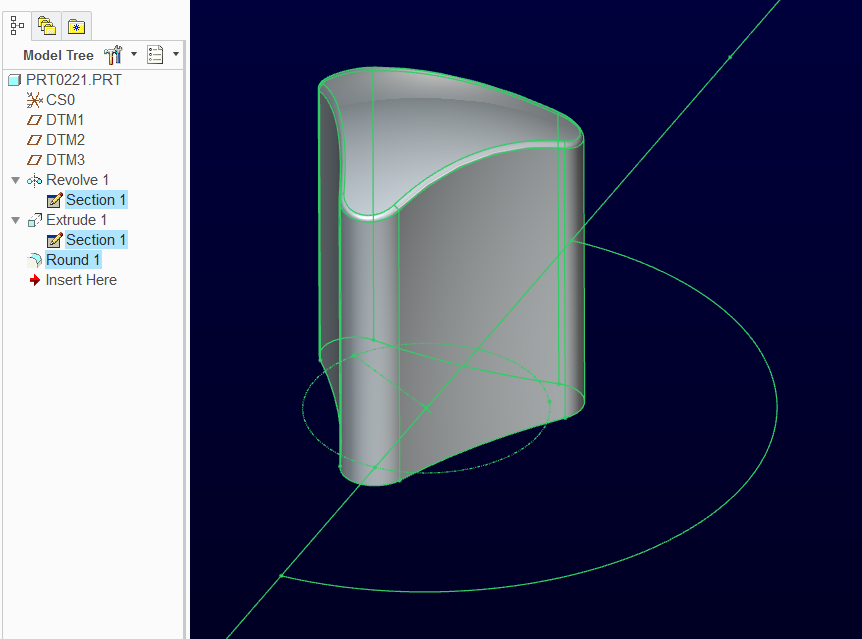
    SphericalBase.PNG

    4 replies

    17-Peridot
    October 1, 2013

    The part was created with a spherical feature as a primary feature and the rest was added and removed.

    1-Visitor
    October 2, 2013

    Thanks for replying.

    Sorry but I dont exactly understand what you mean.

    I started by making a triangle shape then added the rounds at each vertex. I thought from the R313 that I would need to place a large circle so that I could create a remove material extrusion. However it isnt that straightforward as this the height of the vetices are lower than the middle. My thought was I would have to make a r313 extrusion upwards from the bottom to the shape of another circle/arc.

    Thanks for your help.
    Screen+Shot+2013-09-30+at+6.23.30+PM.png

    Screen+Shot+2013-09-30+at+6.23.17+PM.png

    14-Alexandrite
    October 1, 2013

    Or another way, draw the triangle shape first, and then revolve cut the sphere shape into the top.

    OR draw the triangle shape first and then revolve a surface for the sphere and replace the top surface with the sphere surface. but that's kind of a few extra steps.

    17-Peridot
    October 2, 2013

    I have to reitterate this comment. I mis-understood the R313 and R17 callouts. This is a fairly straight forward extrude but it is missing the draft requirement.

    I created a R170 hemisphere and extruded the triangular shape with the remove "remove material" and flipped the removed material to the outside.

    I don't know what the triangular shape is from the limited details provided.

    SphericalBase.PNG

    1-Visitor
    October 2, 2013

    Wow that looks about right. Thanks for all your help so far Antonius!

    So you created the hemisphere, drew a triangle shape-extruded and removed the unnecessary material?

    also how do I do the hemisphere? I am pretty new to Creo and running it on mac so its a lot of messing about.

    Cheers

    P.S. I've attached a more detailed image incase that helps at all.

    14-Alexandrite
    October 5, 2013

    I'm not 100% happy with the way I modeled it. Not really the best methods used. Couple features in there don't really need.

    bside1.JPGbside2.JPGbside3.JPG

    17-Peridot
    October 6, 2013

    Matt, you got there pretty much the same way I did. The only difference in interpretation is the upper core removal where I stayed with a 2.5mm wall on the angled face.

    Also have a look at extrude 9... I just used the optional second extrude direction to fill the small void in extrude 6.

    I also see where you had trouble with the fillets in the bottom core removal where the center rib meets the R11. Since rounds don't like jumping boundaries, I had to extrude it.

    thingy3.PNG

    Of course, leaving the R11 sharp and radiusing it later would also have solved it. But it is one of those things that can cost you a lot of clicking to find out just what failed.

    14-Alexandrite
    October 6, 2013

    Yeah there were a couple things I missed at first and then didn't try to make the tree nicer after. I started out only planning to model the bottom of the part and then decided, screw it I'll just keep going and see how it looks.

    So you're right I could have re-ordered 9, extrude 5 I didn't even need. At first I didn't realize how deep the angle went (cutting into that area).

    Are you saying because mine is R11.5 at the bottom? I just carried the wall thickness down to the bottom, I didn't even try it at R11.

    Loic, come on, we're tired of this one, next part, next part....

    1-Visitor
    October 19, 2013

    HI Guys,

    so heres the last pozt to wrap it up

    1. Clamp feature how to especially
      1. "x" form
      2. remove material
      3. base dimensions
      4. Is it possible to do a shell with a dual shell? (top 3mm and bottom 5mm)Screen+Shot+2013-10-19+at+6.41.11+AM.png
    2. For the previous part, remember the trapezoid section above the cylinder and ball. So far i completd the design but it isnt allowing me to shell out this drawing-Maybe some advice?
    3. Excuse me for dredging up the base again but can anyone explain the barrier type feature? On the top face.

      CHeer fellas and see you.
    14-Alexandrite
    October 19, 2013

    If those are the only numbers you have, a couple ideas are to create this new part in assembly mode with the other part. Or start measuring the other part and writing the numbers down or make yourself a print.

    I have to look at the rest in a bit.

    14-Alexandrite
    October 19, 2013

    This is what that shape looks like to me from that other part.

    shape.JPG