

Solved
Help! special characters not printing right. ± ≥ ect.
I hope someone has an answer for me.
Im trying to make a standard frame for my company and im notacing that when I print to paper or PDF the special characters drop down half a letter height. so 6≤X<30 is aligned like -_---- . It looks fine on screen and it doesnt seam to matter what the font is.
I would realy like to do this correctly and not just have an offset cell for the special characters so that wen it wrongly prints them they are in the right spot.
Please someone tell me that other people are having this problem and that there is a solution.
Im running the latest version of Creo on win10, using foxitPDF and a generic office printer with the same results.
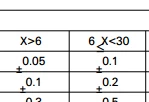 PDF
PDF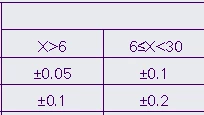 Screen Display
